Join us at FabCon Atlanta from March 16 - 20, 2026, for the ultimate Fabric, Power BI, AI and SQL community-led event. Save $200 with code FABCOMM.
Register now!The Power BI Data Visualization World Championships is back! Get ahead of the game and start preparing now! Learn more
Hi All,
I have a problem creating a measure properly, here is the situation:
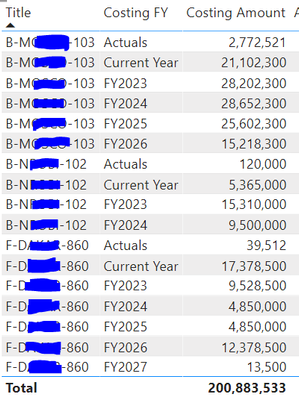
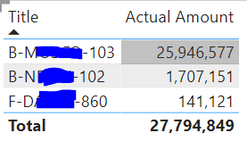
I have 2 tables:
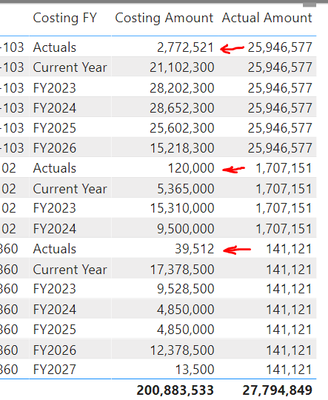
My goal is, when Costing FY="Actuals", replace Costing Amount with Actual Amount, so the amounts stay in 1 column, desired outcome:
I tried calculated column, it didn't work with SUM(Actual Amount).
Can someone help?
Thanks,
Vikki
Solved! Go to Solution.
Thank you for the inspiration. I made a small change of your first solution, and it worked:
if(FIRSTNONBLANK(table[Costing FY]) = "Actual" ,[Actual Amount], [Costing Amount])
Thank you,
Vikki
@Vikki , Try a measure like below. Assuming [Actual Amount], [Costing Amount] are measures
if(max(table[Costing FY]) = "Actual" ,[Actual Amount], [Costing Amount])
or
sumx(summarize(Table,Table[Title], table[Costing FY], "_1", [Actual Amount], "_2",[Costing Amount]), if([Costing FY] = "Actual" ,[Actual Amount], [Costing Amount]))
Thank you for the inspiration. I made a small change of your first solution, and it worked:
if(FIRSTNONBLANK(table[Costing FY]) = "Actual" ,[Actual Amount], [Costing Amount])
Thank you,
Vikki
The Power BI Data Visualization World Championships is back! Get ahead of the game and start preparing now!
Check out the November 2025 Power BI update to learn about new features.
| User | Count |
|---|---|
| 19 | |
| 11 | |
| 9 | |
| 4 | |
| 4 |
| User | Count |
|---|---|
| 35 | |
| 32 | |
| 20 | |
| 12 | |
| 10 |