Join us at FabCon Atlanta from March 16 - 20, 2026, for the ultimate Fabric, Power BI, AI and SQL community-led event. Save $200 with code FABCOMM.
Register now!The Power BI Data Visualization World Championships is back! Get ahead of the game and start preparing now! Learn more
Hi all,
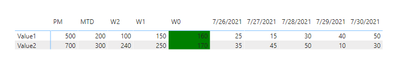
I can't figure out why my measure doesn't work properly. I'm using a measure for background conditional formatting of a cell based on certain conditions (I'm comparing values between W0, W1, and W2). If it's the lowest it should be red, highest - green, in the middle - yellow.
This is my DAX code
Solved! Go to Solution.
@powerbiuser444 Weird, I just fixed it but had to use ALL:
Formatting_Value1 =
VAR ValueW0 = CALCULATE(SUM(Data[Value1]),ALL(Data),Data[date]="W0")
VAR ValueW1 = CALCULATE(SUM(Data[Value1]),ALL(Data),Data[date]="W1")
VAR ValueW2 = CALCULATE(SUM(Data[Value1]),ALL(Data),Data[date]="W2")
RETURN
SWITCH(TRUE(),
ValueW0 < ValueW1 && ValueW0 < ValueW2 && SELECTEDVALUE(Data[date])="W0", "red",
ValueW0 <= ValueW1 && ValueW0 >= ValueW2 && SELECTEDVALUE(Data[date])="W0", "yellow",
ValueW0 >= ValueW1 && ValueW0 <= ValueW2 && SELECTEDVALUE(Data[date])="W0", "yellow",
ValueW0 > ValueW1 && ValueW0 > ValueW2 && SELECTEDVALUE(Data[date])="W0", "green", BLANK())
I fixed myself, it should be in the brackets
@powerbiuser444 Weird, I just fixed it but had to use ALL:
Formatting_Value1 =
VAR ValueW0 = CALCULATE(SUM(Data[Value1]),ALL(Data),Data[date]="W0")
VAR ValueW1 = CALCULATE(SUM(Data[Value1]),ALL(Data),Data[date]="W1")
VAR ValueW2 = CALCULATE(SUM(Data[Value1]),ALL(Data),Data[date]="W2")
RETURN
SWITCH(TRUE(),
ValueW0 < ValueW1 && ValueW0 < ValueW2 && SELECTEDVALUE(Data[date])="W0", "red",
ValueW0 <= ValueW1 && ValueW0 >= ValueW2 && SELECTEDVALUE(Data[date])="W0", "yellow",
ValueW0 >= ValueW1 && ValueW0 <= ValueW2 && SELECTEDVALUE(Data[date])="W0", "yellow",
ValueW0 > ValueW1 && ValueW0 > ValueW2 && SELECTEDVALUE(Data[date])="W0", "green", BLANK())
@powerbiuser444 Couldn't access that link. First thing to try, in your measure try returning ValueW1 for example and return that as a value in your matrix versus background color and see if it shows up correctly in the W0 column. That way at least you will know if the calculation for that variable is correct or not within the filter context provided by the visual.
Check out the November 2025 Power BI update to learn about new features.
Advance your Data & AI career with 50 days of live learning, contests, hands-on challenges, study groups & certifications and more!
| User | Count |
|---|---|
| 21 | |
| 10 | |
| 9 | |
| 4 | |
| 4 |
| User | Count |
|---|---|
| 34 | |
| 31 | |
| 19 | |
| 12 | |
| 10 |