Join us at FabCon Atlanta from March 16 - 20, 2026, for the ultimate Fabric, Power BI, AI and SQL community-led event. Save $200 with code FABCOMM.
Register now!Vote for your favorite vizzies from the Power BI Dataviz World Championship submissions. Vote now!
Hi all,
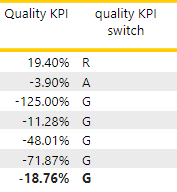
I have generated the below table with two metrics.
The Quality KPI switch =
Solved! Go to Solution.
@Mous007 , a color measure like given below can used in conditional formatting with field value option
quality KPI color = SWITCH(TRUE(),
[Quality KPI] < -0.1 , "Green" ,
[Quality KPI] <= 0 && [Quality KPI] >= -0.1 , "Yellow" ,
[Quality KPI] < 1 , "Red" )
refer for steps
https://radacad.com/dax-and-conditional-formatting-better-together-find-the-biggest-and-smallest-num...
https://docs.microsoft.com/en-us/power-bi/desktop-conditional-table-formatting#color-by-color-values
@Mous007
May be this way:
Quality KPI switch =
SWITCH(
TRUE(),
[Quality KPI] < -0.1 , "Green" ,
[Quality KPI] <= 0 && [Quality KPI] >= -0.1 , "Amber" ,
[Quality KPI] > 1 , "Red"
)________________________
If my answer was helpful, please consider Accept it as the solution to help the other members find it
Click on the Thumbs-Up icon if you like this reply 🙂
⭕ Subscribe and learn Power BI from these videos
⚪ Website ⚪ LinkedIn ⚪ PBI User Group
@Mous007 , a color measure like given below can used in conditional formatting with field value option
quality KPI color = SWITCH(TRUE(),
[Quality KPI] < -0.1 , "Green" ,
[Quality KPI] <= 0 && [Quality KPI] >= -0.1 , "Yellow" ,
[Quality KPI] < 1 , "Red" )
refer for steps
https://radacad.com/dax-and-conditional-formatting-better-together-find-the-biggest-and-smallest-num...
https://docs.microsoft.com/en-us/power-bi/desktop-conditional-table-formatting#color-by-color-values
Vote for your favorite vizzies from the Power BI World Championship submissions!
If you love stickers, then you will definitely want to check out our Community Sticker Challenge!
Check out the January 2026 Power BI update to learn about new features.
| User | Count |
|---|---|
| 6 | |
| 4 | |
| 3 | |
| 3 | |
| 2 |
| User | Count |
|---|---|
| 15 | |
| 11 | |
| 9 | |
| 6 | |
| 5 |