cancel
Showing results for 
Search instead for 
Did you mean: 

We've captured the moments from FabCon & SQLCon that everyone is talking about, and we are bringing them to the community, live and on-demand. Starts on April 14th. Register now

Reply
yogeshk77
Helper I
Helper I

Conditional Rolling Average

I have below mentioned Power BI table structure Table


WeightedVel table contains below columns

“Team_10202” as a String Data type

“Reporting Sprint ID” as an Integer Data type

“Story_Points_10004” as a Decimal Data type


Now, I need a calculated column in this table to get average of last six “Story_Points_10004”, ordered by “Reporting Sprint ID”, grouped by “Team_10202”
Ensure you include the value of the current row in this calculation

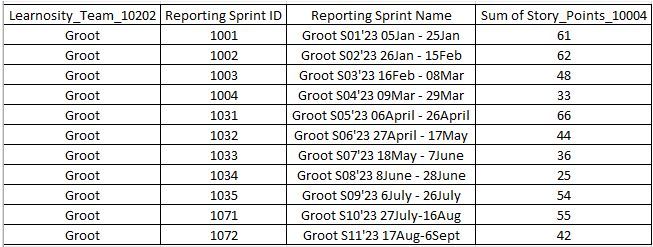
For e.g. if the data is like this ->

1.jpg


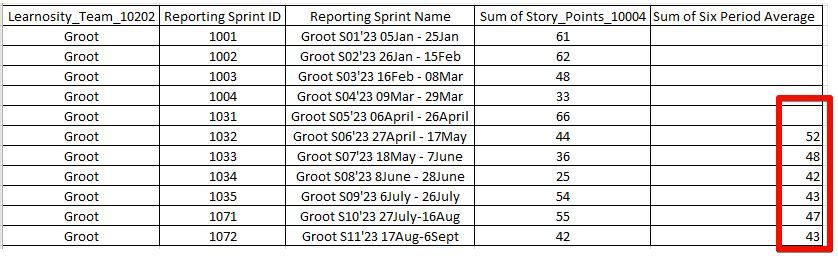
The output should be like this ->


2.jpg

1 ACCEPTED SOLUTION
Anonymous
Not applicable

Hi  @yogeshk77 ,


Here are the steps you can follow:

1. Create calculated column.

rank =
RANKX(
    FILTER(ALL(Expected),
    'Expected'[Team]=EARLIER('Expected'[Team])),[Reporting Sprint ID],,DESC)
Sum of Six Period Average =
IF(
    [rank] <=6,
    AVERAGEX(
        FILTER(ALL('Expected'),
        'Expected'[Team]=EARLIER('Expected'[Team])&&
        'Expected'[rank]>=EARLIER('Expected'[rank])&&'Expected'[rank]<=EARLIER('Expected'[rank])+5),[Story_Points])

)

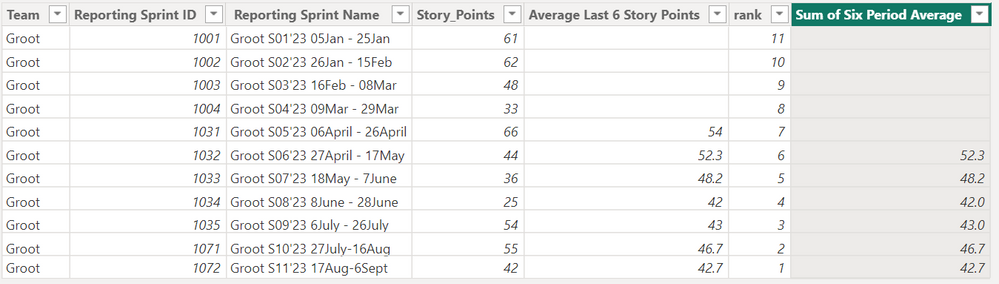
2. Result:


vyangliumsft_0-1695382910572.png


Best Regards,

Liu Yang

If this post helps, then please consider Accept it as the solution to help the other members find it more quickly

View solution in original post

4 REPLIES 4
Anonymous
Not applicable

Hi  @yogeshk77 ,


Here are the steps you can follow:

1. Create calculated column.

rank =
RANKX(
    FILTER(ALL(Expected),
    'Expected'[Team]=EARLIER('Expected'[Team])),[Reporting Sprint ID],,DESC)
Sum of Six Period Average =
IF(
    [rank] <=6,
    AVERAGEX(
        FILTER(ALL('Expected'),
        'Expected'[Team]=EARLIER('Expected'[Team])&&
        'Expected'[rank]>=EARLIER('Expected'[rank])&&'Expected'[rank]<=EARLIER('Expected'[rank])+5),[Story_Points])

)

2. Result:


vyangliumsft_0-1695382910572.png


Best Regards,

Liu Yang

If this post helps, then please consider Accept it as the solution to help the other members find it more quickly

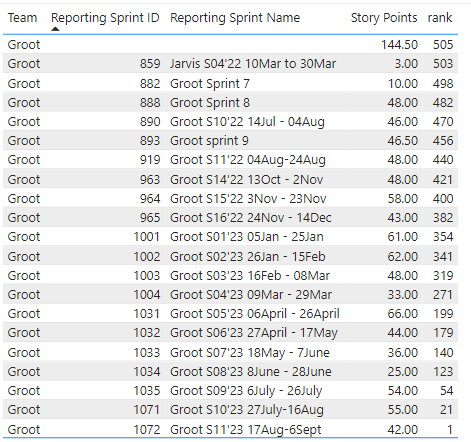
Thank you.. In the stand alone test PBI this works, but in practical I have multiple other teams and looks like due to that combination the rank function is not working as expected.

Here's the result from my actual PBI


yogeshk77_0-1695817342435.png


yogeshk77
Helper I
Helper I

You can check this file


I Need a calculated column in the table called "Data", which shows the output in the below table called "Expected Output"


Greg_Deckler
Community Champion
Community Champion

@yogeshk77 Should be:

Column = 
  VAR __Team = [Learnosity_Team_10202]
  VAR __Sprint = [Reporting Sprint ID]
  VAR __Sprints = SELECTCOLUMNS(FILTER('Table', [Learnosity_Team_10202] = __Team && [Reporting Sprint ID] <= __Sprint), "__SprintID", [Reporting Sprint ID])
  VAR __SprintsText = CONCATENATEX( __Sprints, [__SprintID], "|", [__SprintID], DESC)
  VAR __Table = 
    ADDCOLUMNS(
      GENERATESERIES( 1, COUNTROWS(__Sprints), 1 ),
      "__SprintID", PATHITEM(__SprintsText, [Value])
    )
  VAR __FinalSprints = FILTER(__Table, [Value] <= 6)
  VAR __Result = AVERAGEX( FILTER('Table', [Reporting Sprint ID] IN __FinalSprints), [Sum of Story_Points_10004)
RETURN
  __Result
  

Quite possible that you will get some kind of error complaining about text vs. number. Also, couldn't test this so the probability of a syntax error is fairly high. If you provide your sample data as text, could test this in a PBIX file and provide the PBIX file to you.


Follow on LinkedIn
@ me in replies or I'll lose your thread!!!
Instead of a Kudo, please vote for this idea
Become an expert!: Enterprise DNA
External Tools: MSHGQM
YouTube Channel!: Microsoft Hates Greg
Latest book!:
DAX For Humans

DAX is easy, CALCULATE makes DAX hard...

Helpful resources

Announcements
New to Fabric survey Carousel

New to Fabric Survey

If you have recently started exploring Fabric, we'd love to hear how it's going. Your feedback can help with product improvements.

Power BI DataViz World Championships carousel

Power BI DataViz World Championships - June 2026

A new Power BI DataViz World Championship is coming this June! Don't miss out on submitting your entry.

Join our Fabric User Panel

Join our Fabric User Panel

Share feedback directly with Fabric product managers, participate in targeted research studies and influence the Fabric roadmap.

March Power BI Update Carousel

Power BI Community Update - March 2026

Check out the March 2026 Power BI update to learn about new features.