Join us at FabCon Atlanta from March 16 - 20, 2026, for the ultimate Fabric, Power BI, AI and SQL community-led event. Save $200 with code FABCOMM.
Register now!The Power BI Data Visualization World Championships is back! Get ahead of the game and start preparing now! Learn more
I have a measure (Y1SS = if(COUNTROWS(FILTER(od2a_SuccessStory,od2a_SuccessStory[Year]="Year 1")),"Submitted", "Missing")), is there any way I can include in this DAX formula that if it's 'Submitted', I want the text to display as green and if it's 'Missing', then display as red?
I tried to color the data label, but since it's a measure I wasn't able to get it to work!
Solved! Go to Solution.
Hi @natasha519
Add a color measure .
Y1SS Color = if(COUNTROWS(FILTER(od2a_SuccessStory,od2a_SuccessStory[Year]="Year 1")),"#24FF10 ", "#FF470F")
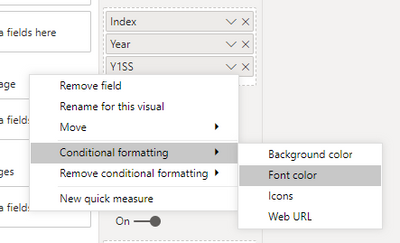
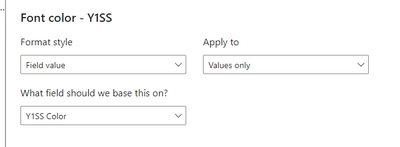
Then choose the measure [Y1SS] you created before , click the drop-down box and select Conditional formatting => Font color , then in Font color pane , select Field value in Format style , Values only in Apply to , the measure which you want to apply color in What field should we base this on .
The final result is as shown :
I have attached my pbix file , you can refer to it .
Best Regard
Community Support Team _ Ailsa Tao
Hi @natasha519
Add a color measure .
Y1SS Color = if(COUNTROWS(FILTER(od2a_SuccessStory,od2a_SuccessStory[Year]="Year 1")),"#24FF10 ", "#FF470F")
Then choose the measure [Y1SS] you created before , click the drop-down box and select Conditional formatting => Font color , then in Font color pane , select Field value in Format style , Values only in Apply to , the measure which you want to apply color in What field should we base this on .
The final result is as shown :
I have attached my pbix file , you can refer to it .
Best Regard
Community Support Team _ Ailsa Tao
Thank you! If I Know the hex code of the green color, how can I incorporate that into the formula? The green is much darker than I thought it would be
Hi @natasha519
Use this link to find the HEX code; https://htmlcolorcodes.com/
If this post helps, please consider accepting it as the solution to help the other members find it more quickly.
Appreciate your Kudos!!
LinkedIn: www.linkedin.com/in/vahid-dm/
Hi,
You can place the hex code where the "green" or "red" values would be so for example:
Y1SS Color = if(COUNTROWS(FILTER(od2a_SuccessStory,od2a_SuccessStory[Year]="Year 1")),"#24FF10", "#FF470F")
Proud to be a Super User!
@natasha519 , Create a color measure and use that in conditional formatting using field value option
Y1SS Color = if(COUNTROWS(FILTER(od2a_SuccessStory,od2a_SuccessStory[Year]="Year 1")),"green", "red")
How to do conditional formatting by measure and apply it on pie?: https://youtu.be/RqBb5eBf_I4
The Power BI Data Visualization World Championships is back! Get ahead of the game and start preparing now!
Check out the November 2025 Power BI update to learn about new features.
| User | Count |
|---|---|
| 20 | |
| 10 | |
| 9 | |
| 4 | |
| 4 |
| User | Count |
|---|---|
| 32 | |
| 31 | |
| 18 | |
| 12 | |
| 11 |