cancel
Showing results for 
Search instead for 
Did you mean: 

The Power BI Data Visualization World Championships is back! Get ahead of the game and start preparing now! Learn more

Reply
Anonymous
Not applicable

Compound Growth Rate for Month wise

I have the few years Data from 2021 to 2025 .  Every year have QTY month wise . i  want find  compund growth for month wise . i used below formula for Years in Excel . i want to convert to Month.


Syntax:

((currentyear)/(previousyear))^(1-n))-1


LIke : 

((Currentmonth)/(PreviousMonth))^(1-n))-1


QTY   Month   year

10       Jan       2021

20       Feb      2021

30       Mar      2021

40       Apr       2021


-----


---

21        Dec      2025


Looking for support .. thanks in advance 

1 ACCEPTED SOLUTION
FreemanZ
Super User
Super User

hi @Anonymous 

supposing you have a table like:

YearMonthQty
202291
2022102
2022113
2022124
202315
202326
202337
202348
202359
2023610
2023711
2023812
2023913
20231014
20231115
20231216
2024117


1) add a calculated column like:


MonthSN = ([Year]*12+[Month])


2) plot a slicer with a calculated table like:


n = 
SELECTCOLUMNS(
    GENERATESERIES(1,20),
    "n", [Value]
)


3) plot a table visual with year and month column and a measure like:


CMGA% = 
VAR _currentmonthSN = MAX(data[MonthSN])
VAR _n = SELECTEDVALUE(n[n])
VAR rate =
    DIVIDE(
        SUM(data[value]),
        CALCULATE(
            SUM(data[value]),
            ALL(data),
            data[MonthSN]=_currentmonthSN-_n
        )
    )^(1/_n)
    -1
RETURN
    IF(rate<>-1, rate, "")


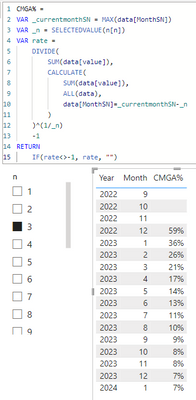
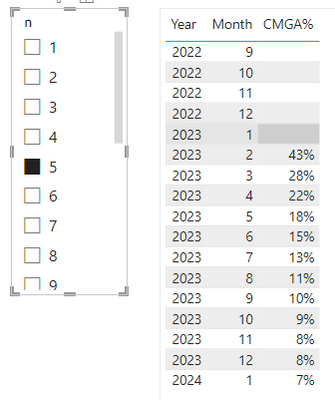
it worked like:

FreemanZ_0-1683615302968.pngFreemanZ_1-1683615320192.png


View solution in original post

2 REPLIES 2
Anonymous
Not applicable

@FreemanZ  Thank you so much . its working 

FreemanZ
Super User
Super User

hi @Anonymous 

supposing you have a table like:

YearMonthQty
202291
2022102
2022113
2022124
202315
202326
202337
202348
202359
2023610
2023711
2023812
2023913
20231014
20231115
20231216
2024117


1) add a calculated column like:


MonthSN = ([Year]*12+[Month])


2) plot a slicer with a calculated table like:


n = 
SELECTCOLUMNS(
    GENERATESERIES(1,20),
    "n", [Value]
)


3) plot a table visual with year and month column and a measure like:


CMGA% = 
VAR _currentmonthSN = MAX(data[MonthSN])
VAR _n = SELECTEDVALUE(n[n])
VAR rate =
    DIVIDE(
        SUM(data[value]),
        CALCULATE(
            SUM(data[value]),
            ALL(data),
            data[MonthSN]=_currentmonthSN-_n
        )
    )^(1/_n)
    -1
RETURN
    IF(rate<>-1, rate, "")


it worked like:

FreemanZ_0-1683615302968.pngFreemanZ_1-1683615320192.png


Helpful resources

Announcements
Power BI DataViz World Championships

Power BI Dataviz World Championships

The Power BI Data Visualization World Championships is back! Get ahead of the game and start preparing now!

December 2025 Power BI Update Carousel

Power BI Monthly Update - December 2025

Check out the December 2025 Power BI Holiday Recap!

FabCon Atlanta 2026 carousel

FabCon Atlanta 2026

Join us at FabCon Atlanta, March 16-20, for the ultimate Fabric, Power BI, AI and SQL community-led event. Save $200 with code FABCOMM.