cancel
Showing results for 
Search instead for 
Did you mean: 

We've captured the moments from FabCon & SQLCon that everyone is talking about, and we are bringing them to the community, live and on-demand. Starts on April 14th. Register now

Reply
ringovski
Helper II
Helper II

Color Formatting

Hi All,

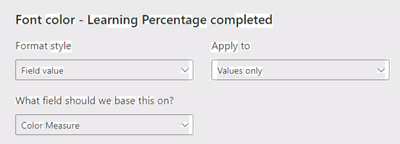
I am trying to format a % measure called "Learning Percentage Completed" with red when it's >50 and <75 then with orange when its greater than 75. I've created a new measure called "color measure" and have tried using a IF statement ( I need to additional conditions later on).


When I just return the number from the IF it returns the correct number;

Color Measure = 
     VAR _per = [Learning Percentage Completed]*100
     RETURN

     _per
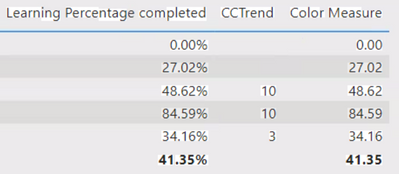
ringovski_0-1651801785668.png


But when I try comparing the numbers they are all orange when only 84.59 should be orange.

Color Measure = 
     VAR _per = [Learning Percentage Completed]*100
     RETURN

     IF(_per >50 && _per < 75, "Red","Orange")
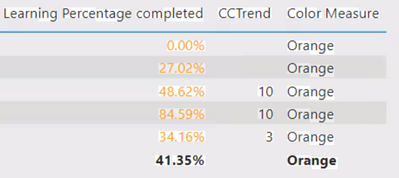
ringovski_1-1651802021532.png


ringovski_2-1651802120078.png

This should be pretty simple but what am I missing?


Thanks

1 ACCEPTED SOLUTION
amitchandak
Super User
Super User

@ringovski , This seems fine .


Try this


Color Measure = Switch( True() ,

[Learning Percentage Completed] >.5 && [Learning Percentage Completed]  <.75, "Red",

"Orange"

)


If this does not help
Can you share a sample pbix after removing sensitive data.

Share with Power BI Enthusiasts: Full Power BI Video (20 Hours) YouTube
Microsoft Fabric Series 60+ Videos YouTube
Microsoft Fabric Hindi End to End YouTube

View solution in original post

2 REPLIES 2
amitchandak
Super User
Super User

@ringovski , This seems fine .


Try this


Color Measure = Switch( True() ,

[Learning Percentage Completed] >.5 && [Learning Percentage Completed]  <.75, "Red",

"Orange"

)


If this does not help
Can you share a sample pbix after removing sensitive data.

Share with Power BI Enthusiasts: Full Power BI Video (20 Hours) YouTube
Microsoft Fabric Series 60+ Videos YouTube
Microsoft Fabric Hindi End to End YouTube

I got it by adding a third condition, as it is technically correct at the moment becuase it changing values below 50 as these aren't 50 to 75.


Color Measure = 
     VAR _per = [Learning Percentage Completed]*100
     RETURN

     IF(_per >50 && _per < 75, "Red",

           IF(_per > 75, "Orange",""))

Helpful resources

Announcements
New to Fabric survey Carousel

New to Fabric Survey

If you have recently started exploring Fabric, we'd love to hear how it's going. Your feedback can help with product improvements.

Power BI DataViz World Championships carousel

Power BI DataViz World Championships - June 2026

A new Power BI DataViz World Championship is coming this June! Don't miss out on submitting your entry.

Join our Fabric User Panel

Join our Fabric User Panel

Share feedback directly with Fabric product managers, participate in targeted research studies and influence the Fabric roadmap.

March Power BI Update Carousel

Power BI Community Update - March 2026

Check out the March 2026 Power BI update to learn about new features.