cancel
Showing results for 
Search instead for 
Did you mean: 

View all the Fabric Data Days sessions on demand. View schedule

Reply
Anonymous
Not applicable

Change shown value

Hi guys,

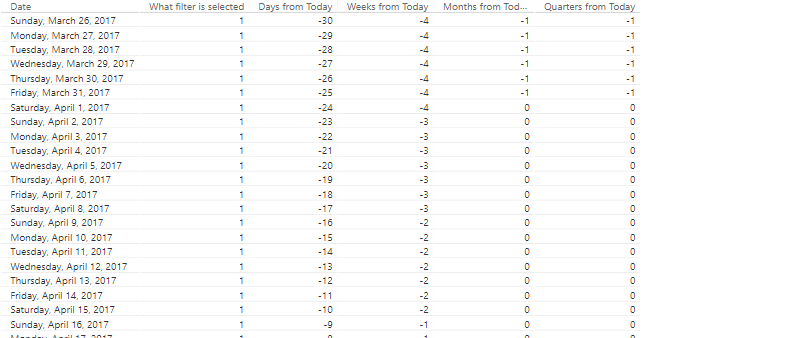
Is there a way in Power BI, to change the shown values in the chart? For example, in the picture I'm sharing, instead of seeing all those 1s, I want see check marks. Is it possible to put an image for certain values? 
1.PNG

Thanks!

1 ACCEPTED SOLUTION
Anonymous
Not applicable

Find the font that has the glyphs you need and then return those instead of 1. You can get any glyph you want using the unicode function in DAX or something like that...


Check out this website: https://www.biinsight.com/using-unicode-characters-in-power-bi/


Best

Darek

View solution in original post

2 REPLIES 2
Anonymous
Not applicable

Find the font that has the glyphs you need and then return those instead of 1. You can get any glyph you want using the unicode function in DAX or something like that...


Check out this website: https://www.biinsight.com/using-unicode-characters-in-power-bi/


Best

Darek

Anonymous
Not applicable

Thanks Darek!

Helpful resources

Announcements
November Power BI Update Carousel

Power BI Monthly Update - November 2025

Check out the November 2025 Power BI update to learn about new features.

Fabric Data Days Carousel

Fabric Data Days

Advance your Data & AI career with 50 days of live learning, contests, hands-on challenges, study groups & certifications and more!

FabCon Atlanta 2026 carousel

FabCon Atlanta 2026

Join us at FabCon Atlanta, March 16-20, for the ultimate Fabric, Power BI, AI and SQL community-led event. Save $200 with code FABCOMM.