Join us at FabCon Atlanta from March 16 - 20, 2026, for the ultimate Fabric, Power BI, AI and SQL community-led event. Save $200 with code FABCOMM.
Register now!The Power BI Data Visualization World Championships is back! Get ahead of the game and start preparing now! Learn more
I posted this before but the solution didn’t work.
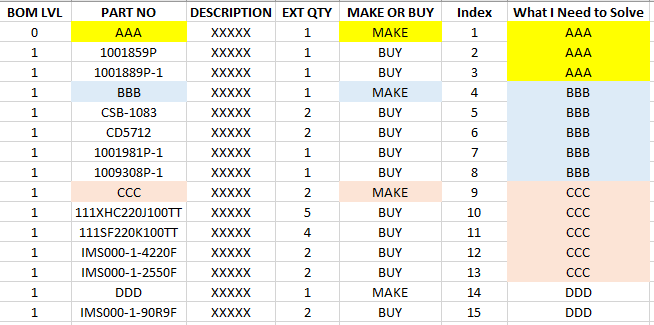
I need DAX formula to create the values in the last column. The value in the [MAKE OR BUY] column would trigger the change to the value in [PART NO], and carry that until the next change.
Does it have to be dax, or could you use power query. Seems easier in Power Query, just create a conditional column that if Make or Buy = Make the Part No else null. Then you can just fill down
Yeah, PQ is the right place to do it.
Best
Darek
Check out the November 2025 Power BI update to learn about new features.
Advance your Data & AI career with 50 days of live learning, contests, hands-on challenges, study groups & certifications and more!
| User | Count |
|---|---|
| 21 | |
| 10 | |
| 9 | |
| 4 | |
| 4 |
| User | Count |
|---|---|
| 35 | |
| 31 | |
| 20 | |
| 13 | |
| 11 |