cancel
Showing results for 
Search instead for 
Did you mean: 

The Power BI Data Visualization World Championships is back! Get ahead of the game and start preparing now! Learn more

Reply
Efsteps
Frequent Visitor

Caltulate an average in between two columns from different tables, based on a relationship.

Hi to everyone, i have a cuestion with this two tables:

1. A database with the information from Employees.

image.png

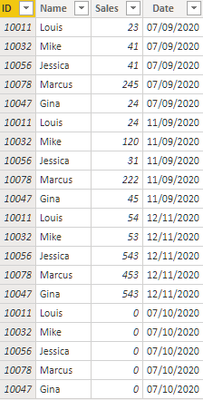
2. Sales report of each one 


image.png


What i need is add a column to the table #1 with an average based on each ID employe taking the sales from the other table, if is possible add a rule that limits year by year, month to month i've been working on this for days and not having results, hope someone can know how i can work this.

Thank you very much for reading.

1 ACCEPTED SOLUTION
Greg_Deckler
Community Champion
Community Champion

Sounds like you need to create a column like:


Average Sales = AVERAGEX(RELATEDTABLE('Sales'),'Sales'[Sales])


You can also wrap RELATEDTABLE with a FILTER to filter down to just the rows you want like:


Average Sales = AVERAGEX(FILTER(RELATEDTABLE('Sales'),YEAR([Date]) = 2020),'Sales'[Sales])


If this is not what you are looking for, Please see this post regarding How to Get Your Question Answered Quickly: https://community.powerbi.com/t5/Community-Blog/How-to-Get-Your-Question-Answered-Quickly/ba-p/38490

The most important parts are:
1. Sample data as text, use the table tool in the editing bar
2. Expected output from sample data
3. Explanation in words of how to get from 1. to 2.


Follow on LinkedIn
@ me in replies or I'll lose your thread!!!
Instead of a Kudo, please vote for this idea
Become an expert!: Enterprise DNA
External Tools: MSHGQM
YouTube Channel!: Microsoft Hates Greg
Latest book!:
DAX For Humans

DAX is easy, CALCULATE makes DAX hard...

View solution in original post

3 REPLIES 3
Greg_Deckler
Community Champion
Community Champion

Sounds like you need to create a column like:


Average Sales = AVERAGEX(RELATEDTABLE('Sales'),'Sales'[Sales])


You can also wrap RELATEDTABLE with a FILTER to filter down to just the rows you want like:


Average Sales = AVERAGEX(FILTER(RELATEDTABLE('Sales'),YEAR([Date]) = 2020),'Sales'[Sales])


If this is not what you are looking for, Please see this post regarding How to Get Your Question Answered Quickly: https://community.powerbi.com/t5/Community-Blog/How-to-Get-Your-Question-Answered-Quickly/ba-p/38490

The most important parts are:
1. Sample data as text, use the table tool in the editing bar
2. Expected output from sample data
3. Explanation in words of how to get from 1. to 2.


Follow on LinkedIn
@ me in replies or I'll lose your thread!!!
Instead of a Kudo, please vote for this idea
Become an expert!: Enterprise DNA
External Tools: MSHGQM
YouTube Channel!: Microsoft Hates Greg
Latest book!:
DAX For Humans

DAX is easy, CALCULATE makes DAX hard...

It's great thank you very much!!!!

Just a little additional cuestion how can i add another filtere that ignores "0" values this is in case that the employee isn't working that day 


Thanks for reading.

Sure @Efsteps you could do something like:


Average Sales = AVERAGEX(FILTER(RELATEDTABLE('Sales'),YEAR([Date]) = 2020 && [Sales] <> 0),'Sales'[Sales])


Follow on LinkedIn
@ me in replies or I'll lose your thread!!!
Instead of a Kudo, please vote for this idea
Become an expert!: Enterprise DNA
External Tools: MSHGQM
YouTube Channel!: Microsoft Hates Greg
Latest book!:
DAX For Humans

DAX is easy, CALCULATE makes DAX hard...

Helpful resources

Announcements
Power BI DataViz World Championships

Power BI Dataviz World Championships

The Power BI Data Visualization World Championships is back! Get ahead of the game and start preparing now!

December 2025 Power BI Update Carousel

Power BI Monthly Update - December 2025

Check out the December 2025 Power BI Holiday Recap!

FabCon Atlanta 2026 carousel

FabCon Atlanta 2026

Join us at FabCon Atlanta, March 16-20, for the ultimate Fabric, Power BI, AI and SQL community-led event. Save $200 with code FABCOMM.