Share feedback directly with Fabric product managers, participate in targeted research studies and influence the Fabric roadmap.
Sign up nowGet Fabric certified for FREE! Don't miss your chance! Learn more
Hello,
I'm hoping that someone can provide me with the DAX to accomplish the following
Thank you for your time,
Bob
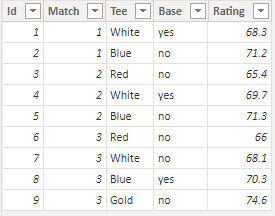
Here is the raw data:
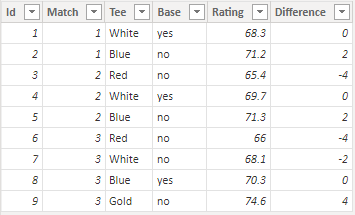
I need to add the calculated column, Difference:
Pseudo code: Rating - Base Rating for each match:
Solved! Go to Solution.
Hi @bob57
Here is a sample file with the solution https://we.tl/t-KWLD6ZeAMf
Difference =
VAR CurrentBase = Data[Base]
VAR CurrentRating = Data[Rating]
VAR CurrentMatchYesRating = CALCULATE ( MAX ( Data[Rating] ), ALLEXCEPT ( Data, Data[Match] ), Data[Base] = "yes" )
VAR Result =
IF (
CurrentBase = "no",
CurrentRating - CurrentMatchYesRating,
0
)
RETURN
ROUNDDOWN ( Result, 0 )You may need to readjust the rounding type as per your requirement.
Hi @bob57
Here is a sample file with the solution https://we.tl/t-KWLD6ZeAMf
Difference =
VAR CurrentBase = Data[Base]
VAR CurrentRating = Data[Rating]
VAR CurrentMatchYesRating = CALCULATE ( MAX ( Data[Rating] ), ALLEXCEPT ( Data, Data[Match] ), Data[Base] = "yes" )
VAR Result =
IF (
CurrentBase = "no",
CurrentRating - CurrentMatchYesRating,
0
)
RETURN
ROUNDDOWN ( Result, 0 )You may need to readjust the rounding type as per your requirement.
That did the trick! Thank you so much.
My apologies. I neglected to mention that the calculation must be rounded to the nearest whole number.
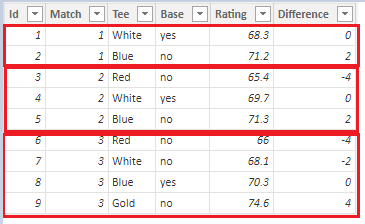
I did it by hand for demonstration purposes. But the algorithm would go like this:
For each Match (1, 2, and 3) subtract the Base Rating (Rating where Base = yes) from the Rating and round to the nearest whole.
The calculation must be independent for the match so for Match = 2, for example:
when Tee = Red, then 65.4 - 69.7 = -4
when Tee = White, then 69.7 – 69.7 = 0
when Tee = Blue, then 71.3 – 69.7 = 2
I hope this offers the required clarity.
Bob
If you love stickers, then you will definitely want to check out our Community Sticker Challenge!
Check out the January 2026 Power BI update to learn about new features.
| User | Count |
|---|---|
| 5 | |
| 4 | |
| 4 | |
| 3 | |
| 2 |
| User | Count |
|---|---|
| 12 | |
| 9 | |
| 8 | |
| 7 | |
| 5 |