cancel
Showing results for 
Search instead for 
Did you mean: 

The Power BI Data Visualization World Championships is back! Get ahead of the game and start preparing now! Learn more

Reply
BILearner
Advocate I
Advocate I

Calculate values in one fact table from another fact table

Hi ,

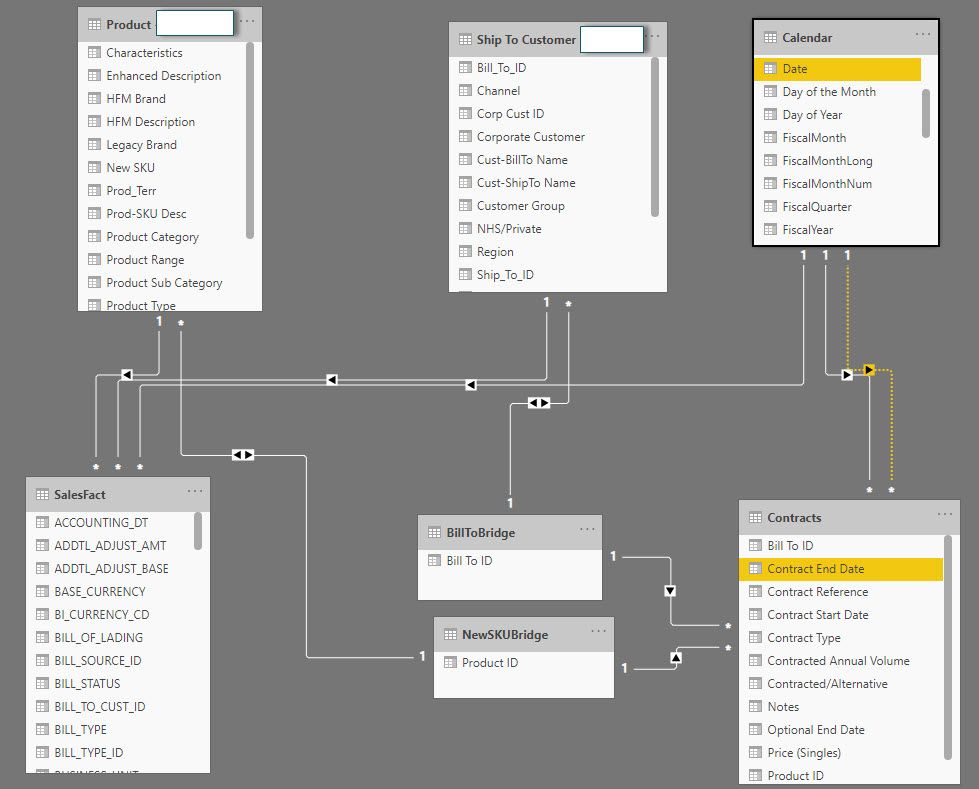
I have following data model which has 2 fact tables 3 dimension tables and 1 bridge table to resolve many to many relationship. 
 

Data Model - Forum.jpg


I am trying to calculate Sales Volume since the contract Start Date for each "Product ID" in Contracts Table using following formula

Sales Volume Since Contract Start Date=
CALCULATE ([Total Volume],
FILTER (
SalesFact,
SalesFact[INVOICE_DATE]
>= MIN ( Contracts[Contract Start Date] )
),
SalesFact[PRODUCT_ID]
IN VALUES ( Contracts[Product ID] ),
SalesFact[BILL_TO_CUST_ID]
IN VALUES ( Contracts[Bill To ID] )
)


I get correct results when I throw this measure in a table which provides Context for  MIN ( Contracts[Contract Start Date] ) . However, if I throw this measure in a card visual or in any other visual without a Contract Start date context I get incorrect results. 

Can somone please tell me how can I resolve this? I think I need to use somekind of iterator function to get the result I need, but I can't seem to figure it out.  

Thanks! 


4 REPLIES 4
amitchandak
Super User
Super User

@BILearner , Try like. In case it joined with contract table and other tables, then what is need of in clause


sumx(summarize(Contracts, Contracts[Product ID] , "_1" ,CALCULATE ([Total Volume],
FILTER (
SalesFact,
SalesFact[INVOICE_DATE]
>= MIN ( Contracts[Contract Start Date] )
)
)) ,[_1])

Share with Power BI Enthusiasts: Full Power BI Video (20 Hours) YouTube
Microsoft Fabric Series 60+ Videos YouTube
Microsoft Fabric Hindi End to End YouTube

Thank you for your advice @amitchandak I was able to build on your formula to come up with following forumla

Actual Volume =
SUMX (
ADDCOLUMNS (
SUMMARIZE (
Contracts,
'NewSKUBridge'[Product ID],
BillToBridge[Bill To ID]
),
"Act Vol", CALCULATE([Total Units Sgls],DATESBETWEEN('Calendar'[Date],MIN(Contracts[Contract Start Date]),MAX(Contracts[Contract End Date])))
),
[Act Vol]
)
However, with this formula the Date is always locked to contract start date and contract end date. What I want is a user should be able to make a selection on date slider/slicer to see back in time. However this solution doesn't allow that as the start and end dates are locked based on dates in Contract Table.

So, I wrote another measure as follows, but it is not working at all. 

Actual Volume 2 =
SUMX (
ADDCOLUMNS (
SUMMARIZE (
Contracts,
'NewSKUBridge'[Product ID],
BillToBridge[Bill To ID]
),
"Act Vol", CALCULATE([Total Units Sgls],DATESBETWEEN('Calendar'[Date],MIN('Calendar'[Date])>=MIN(Contracts[Contract Start Date]),MAX('Calendar'[Date])<=CALCULATE(MAX(Contracts[Contract End Date]),USERELATIONSHIP(Contracts[Contract End Date],'Calendar'[Date]))))
),
[Act Vol]
)
Could you please advice how can I fix this? 

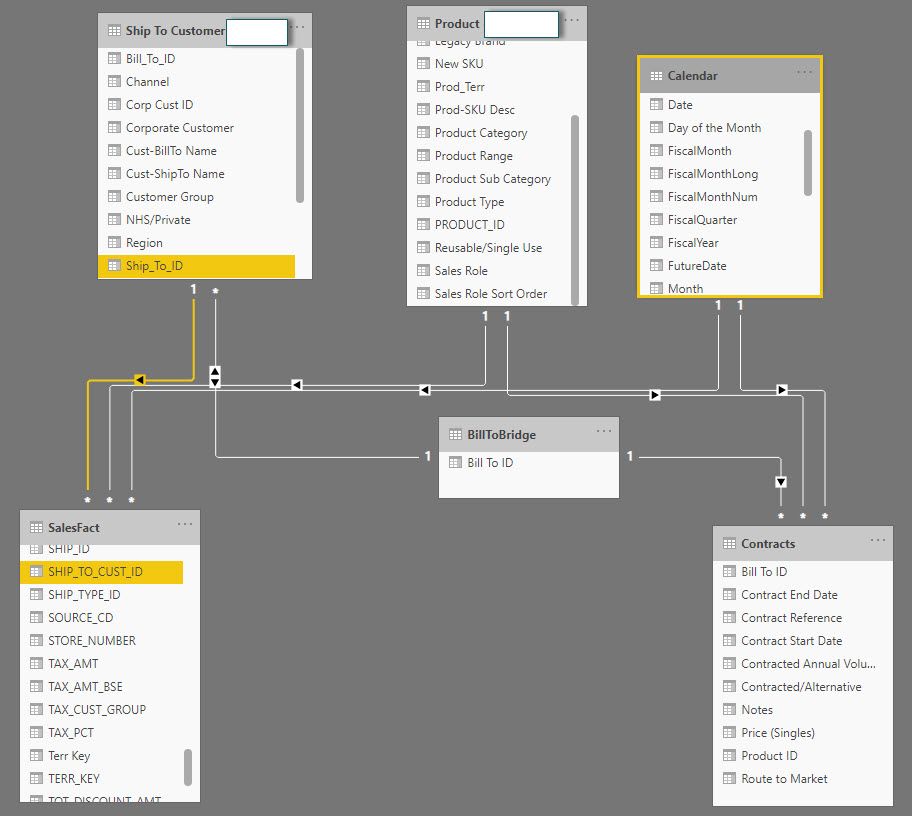
Below is the updated data model with inactive relationship between calendar-date field and Contract End Date
 
Data Model 2 - Forum.jpg


amitchandak
Super User
Super User

@BILearner , Try with Values at Invoice Id or Date level

CALCULATE ([Total Volume],
FILTER (
SalesFact,
SalesFact[INVOICE_DATE]
>= MIN ( Contracts[Contract Start Date] )
),
SalesFact[PRODUCT_ID]
IN VALUES ( Contracts[Product ID] ),
SalesFact[BILL_TO_CUST_ID]
IN VALUES ( Contracts[Bill To ID] )
, values(SalesFact[INVOICE_ID]) //SalesFact[INVOICE_DATE]
)

Share with Power BI Enthusiasts: Full Power BI Video (20 Hours) YouTube
Microsoft Fabric Series 60+ Videos YouTube
Microsoft Fabric Hindi End to End YouTube

@amitchandak  Thank you for your response I tried both of your solution with Values(INVOICE_ID)// INVOICE_DATE.

It didn't work, it gave me the exact same result as my previous formula.

Helpful resources

Announcements
Power BI DataViz World Championships

Power BI Dataviz World Championships

The Power BI Data Visualization World Championships is back! Get ahead of the game and start preparing now!

November Power BI Update Carousel

Power BI Monthly Update - November 2025

Check out the November 2025 Power BI update to learn about new features.

FabCon Atlanta 2026 carousel

FabCon Atlanta 2026

Join us at FabCon Atlanta, March 16-20, for the ultimate Fabric, Power BI, AI and SQL community-led event. Save $200 with code FABCOMM.