FabCon is coming to Atlanta
Join us at FabCon Atlanta from March 16 - 20, 2026, for the ultimate Fabric, Power BI, AI and SQL community-led event. Save $200 with code FABCOMM.
Register now!- Power BI forums
- Get Help with Power BI
- Desktop
- Service
- Report Server
- Power Query
- Mobile Apps
- Developer
- DAX Commands and Tips
- Custom Visuals Development Discussion
- Health and Life Sciences
- Power BI Spanish forums
- Translated Spanish Desktop
- Training and Consulting
- Instructor Led Training
- Dashboard in a Day for Women, by Women
- Galleries
- Data Stories Gallery
- Themes Gallery
- Contests Gallery
- QuickViz Gallery
- Quick Measures Gallery
- Visual Calculations Gallery
- Notebook Gallery
- Translytical Task Flow Gallery
- TMDL Gallery
- R Script Showcase
- Webinars and Video Gallery
- Ideas
- Custom Visuals Ideas (read-only)
- Issues
- Issues
- Events
- Upcoming Events
The Power BI Data Visualization World Championships is back! Get ahead of the game and start preparing now! Learn more
- Power BI forums
- Forums
- Get Help with Power BI
- DAX Commands and Tips
- Calculate the previous month value with the same d...
- Subscribe to RSS Feed
- Mark Topic as New
- Mark Topic as Read
- Float this Topic for Current User
- Bookmark
- Subscribe
- Printer Friendly Page

- Mark as New
- Bookmark
- Subscribe
- Mute
- Subscribe to RSS Feed
- Permalink
- Report Inappropriate Content
Calculate the previous month value with the same date range
Hello,
I have problem with defining dax for calculating the sum of previous month, the conditions:
- This month is February and the data is only available until 19 February, I have calculated this month ongoing sum which is from 1-19 February as selected month measure.
- I want to calculate the same period in previous month but with the same date range as I have now, i.e. sum of sales 1-19 February vs. sum of 1-19 January.
Ive tried to use this formula (shown below), but it calculates the entire sum of sales in January instead of 1-19 January only.
What step do I miss? Really need your help, thanks in advance guys 🙂

Solved! Go to Solution.


- Mark as New
- Bookmark
- Subscribe
- Mute
- Subscribe to RSS Feed
- Permalink
- Report Inappropriate Content
Hi,
Try switching the order of your fucntions:
This will calculate MTD amounts for the previous month (using the same date range).
I hope this post helps to solve your issue and if it does consider accepting it as a solution and giving the post a thumbs up!
My LinkedIn: https://www.linkedin.com/in/n%C3%A4ttiahov-00001/
Did I answer your question? Mark my post as a solution!
Proud to be a Super User!


- Mark as New
- Bookmark
- Subscribe
- Mute
- Subscribe to RSS Feed
- Permalink
- Report Inappropriate Content
Hi @bimagty
You can try these measures. I attached a sample pbix at bottom.
This Month =
VAR _endDate = MAX(Revenues[Date])
VAR _startDate = EOMONTH(_endDate,-1)+1
RETURN
CALCULATE(SUM(Revenues[Revenue]),DATESBETWEEN('Calendar'[Date],_startDate,_endDate))
Previous Month =
VAR _maxDate = MAX(Revenues[Date])
VAR _startDate = EOMONTH(_maxDate,-2) + 1
VAR _endDate = _startDate + DAY(_maxDate) - 1
RETURN
CALCULATE(SUM(Revenues[Revenue]),DATESBETWEEN('Calendar'[Date],_startDate,_endDate))
Best Regards,
Community Support Team _ Jing
If this post helps, please Accept it as Solution to help other members find it.
- Mark as New
- Bookmark
- Subscribe
- Mute
- Subscribe to RSS Feed
- Permalink
- Report Inappropriate Content
Hi @bimagty
You can try these measures. I attached a sample pbix at bottom.
This Month =
VAR _endDate = MAX(Revenues[Date])
VAR _startDate = EOMONTH(_endDate,-1)+1
RETURN
CALCULATE(SUM(Revenues[Revenue]),DATESBETWEEN('Calendar'[Date],_startDate,_endDate))
Previous Month =
VAR _maxDate = MAX(Revenues[Date])
VAR _startDate = EOMONTH(_maxDate,-2) + 1
VAR _endDate = _startDate + DAY(_maxDate) - 1
RETURN
CALCULATE(SUM(Revenues[Revenue]),DATESBETWEEN('Calendar'[Date],_startDate,_endDate))
Best Regards,
Community Support Team _ Jing
If this post helps, please Accept it as Solution to help other members find it.


- Mark as New
- Bookmark
- Subscribe
- Mute
- Subscribe to RSS Feed
- Permalink
- Report Inappropriate Content
Great solution @v-jingzhang - this is the best and works for me amongst all the hacks I have gone thru so far on the web.
Really helped me out of a tacky situation!
- Mark as New
- Bookmark
- Subscribe
- Mute
- Subscribe to RSS Feed
- Permalink
- Report Inappropriate Content
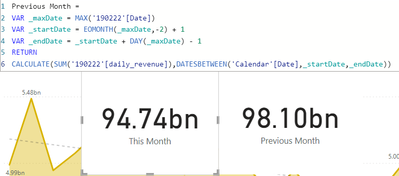
Yeay, great solution!
Thank you very much, now it works well.
- Mark as New
- Bookmark
- Subscribe
- Mute
- Subscribe to RSS Feed
- Permalink
- Report Inappropriate Content
Hi,
Try switching the order of your fucntions:
This will calculate MTD amounts for the previous month (using the same date range).
I hope this post helps to solve your issue and if it does consider accepting it as a solution and giving the post a thumbs up!
My LinkedIn: https://www.linkedin.com/in/n%C3%A4ttiahov-00001/
Did I answer your question? Mark my post as a solution!
Proud to be a Super User!
- Mark as New
- Bookmark
- Subscribe
- Mute
- Subscribe to RSS Feed
- Permalink
- Report Inappropriate Content
Hi,
Thanks for the reply, but unfortunately I still get the same result as before, it calculates the total of 1 month instead of only selected range of date.

test is the measure following your suggestion, and the Previous Month Revenue is the total revenue in a full month (January).

Helpful resources

Power BI Dataviz World Championships
The Power BI Data Visualization World Championships is back! Get ahead of the game and start preparing now!

Power BI Monthly Update - December 2025
Check out the December 2025 Power BI Holiday Recap!

FabCon Atlanta 2026
Join us at FabCon Atlanta, March 16-20, for the ultimate Fabric, Power BI, AI and SQL community-led event. Save $200 with code FABCOMM.

| User | Count |
|---|---|
| 19 | |
| 13 | |
| 8 | |
| 4 | |
| 4 |


| User | Count |
|---|---|
| 29 | |
| 19 | |
| 18 | |
| 11 | |
| 10 |


