cancel
Showing results for 
Search instead for 
Did you mean: 

The Power BI Data Visualization World Championships is back! It's time to submit your entry. Live now!

Reply
Anonymous
Not applicable

Calculate the percentage of table matrix as well as subtotals

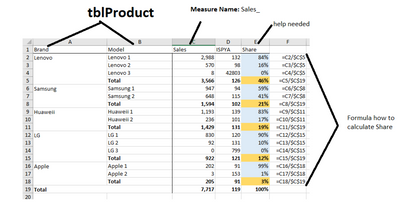
I need to calculate the Share of the below table, I was able to calculate in Pbi the share per Brand by using this DAX
=DIVIDE([Sales_], CALCULATE([Sales_], ALLEXCEPT('tblProduct','tblProduct'[Brand_name])))


However subtotal needs to calculate the share base on column total (sub-total / Column Total)


In my case sub-total is returning 100%


Requirements: i write here as well the excel formula (Column F) on how to calculate the share and its sub-total.

ericnumber14_1-1646298463337.png


2 ACCEPTED SOLUTIONS
amitchandak
Super User
Super User

@Anonymous , Create a measure like


if(isinscope('tblProduct'[Model]) ,

DIVIDE([Sales_], CALCULATE([Sales_], ALLEXCEPT('tblProduct','tblProduct'[Brand_name]))),

DIVIDE([Sales_], CALCULATE([Sales_], ALL()))

)


Share with Power BI Enthusiasts: Full Power BI Video (20 Hours) YouTube
Microsoft Fabric Series 60+ Videos YouTube
Microsoft Fabric Hindi End to End YouTube

View solution in original post

tamerj1
Community Champion
Community Champion

Hi @Anonymous 
You can use


Share per Brand = 
VAR ProductSahre =
    DIVIDE (
        [Sales_],
        CALCULATE ( 
            [Sales_],
            ALLEXCEPT ( 'tblProduct','tblProduct'[Brand_name] )
        )
    )
VAR BrandShare =
    DIVIDE (
        [Sales_],
        CALCULATE ( 
            [Sales_],
            REMOVEFILTERS ( 'tblProduct' )
        )
    )
VAR Result =
    IF ( 
        HASONEVALUE ( 'tblProduct'[Model] ),
        ProductSahre,
        BrandShare
    )
RETURN
    Result


View solution in original post

4 REPLIES 4
Anonymous
Not applicable

This works as well, together with using dims in another table, thanks a lot!

tamerj1
Community Champion
Community Champion

Hi @Anonymous 
You can use


Share per Brand = 
VAR ProductSahre =
    DIVIDE (
        [Sales_],
        CALCULATE ( 
            [Sales_],
            ALLEXCEPT ( 'tblProduct','tblProduct'[Brand_name] )
        )
    )
VAR BrandShare =
    DIVIDE (
        [Sales_],
        CALCULATE ( 
            [Sales_],
            REMOVEFILTERS ( 'tblProduct' )
        )
    )
VAR Result =
    IF ( 
        HASONEVALUE ( 'tblProduct'[Model] ),
        ProductSahre,
        BrandShare
    )
RETURN
    Result


amitchandak
Super User
Super User

@Anonymous , Create a measure like


if(isinscope('tblProduct'[Model]) ,

DIVIDE([Sales_], CALCULATE([Sales_], ALLEXCEPT('tblProduct','tblProduct'[Brand_name]))),

DIVIDE([Sales_], CALCULATE([Sales_], ALL()))

)


Share with Power BI Enthusiasts: Full Power BI Video (20 Hours) YouTube
Microsoft Fabric Series 60+ Videos YouTube
Microsoft Fabric Hindi End to End YouTube
Anonymous
Not applicable

It works! 🙂 

I have another requirements, same table as my example but we need to add additional column at Highest level, but this comes from another table, 
lets call the column as Customer_name from tblCustomer.


Helpful resources

Announcements
Power BI DataViz World Championships

Power BI Dataviz World Championships

The Power BI Data Visualization World Championships is back! It's time to submit your entry.

December 2025 Power BI Update Carousel

Power BI Monthly Update - December 2025

Check out the December 2025 Power BI Holiday Recap!

FabCon Atlanta 2026 carousel

FabCon Atlanta 2026

Join us at FabCon Atlanta, March 16-20, for the ultimate Fabric, Power BI, AI and SQL community-led event. Save $200 with code FABCOMM.