cancel
Showing results for 
Search instead for 
Did you mean: 

The Power BI Data Visualization World Championships is back! Get ahead of the game and start preparing now! Learn more

Reply
jereaallikko
Helper III
Helper III

Calculate difference % with all values

Hi,


I am facing a problem with calculating % difference. In a nuthsell, I would like to visualize the difference of X and ALL Values in a table separately. An example data and use case below:

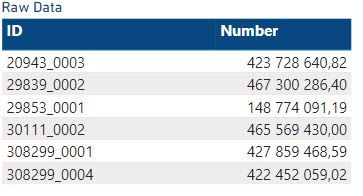
PBIExample.JPG

Ideally, I am looking for a solution (DAX or something else) to calculate the "Number" difference % between 20943_0003 and the rest of the values separately. Similarly, difference % between 29839_0002 and the rest of the values separately, then 29853_0001 and so on..

The idea is that the user can choose and filter ANY ID and see the % difference to every ID Number.


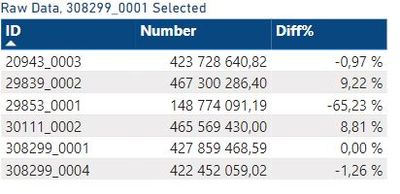
The result what I am looking for is this:

PBIEx1.JPG


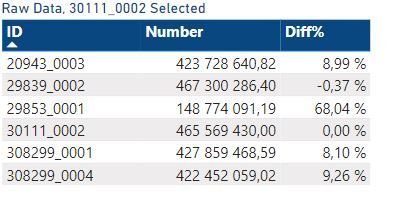
Or this:
PBIEx2.JPG

And same for every Number of each ID. A bit difficult to explain, but hopefully you get the idea. 


Is this even possible to do? Anyt tips?


Br,

Jere

1 ACCEPTED SOLUTION
v-cazheng-msft
Community Support
Community Support

Hi @jereaallikko ,


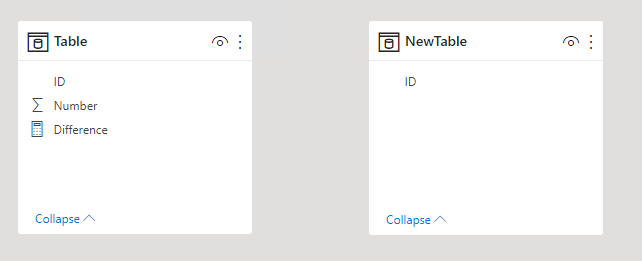
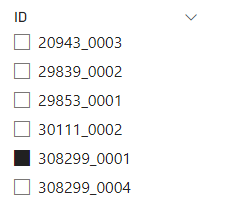
Just as tamerj1 said, you need create a new table with all IDs and don’t create any relationship between these two tables. Then, take the ID column in the new table to create a Slicer.

vcazhengmsft_0-1649312450164.png


vcazhengmsft_1-1649312450164.png


But after that, you need create a Measure like this.

Difference =
VAR SelectedID =
    SELECTEDVALUE ( 'NewTable'[ID] )
VAR SelectedNumber =
    CALCULATE ( MAX ( 'Table'[Number] ), 'Table'[ID] = SelectedID )
RETURN
    DIVIDE ( MAX ( 'Table'[Number] ) - SelectedNumber, SelectedNumber )


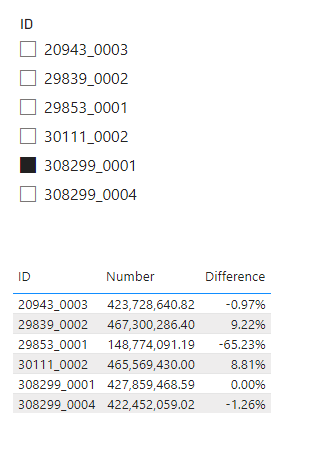
Then the result will look like this.

vcazhengmsft_2-1649312450166.png


vcazhengmsft_3-1649312450168.png


If this post helps, then please consider Accept it as the solution to help the other members find it more quickly. If I misunderstand your needs or you still have problems on it, please feel free to let me know. Thanks a lot!


Best Regards,

Community Support Team _ Caiyun

View solution in original post

3 REPLIES 3
v-cazheng-msft
Community Support
Community Support

Hi @jereaallikko ,


Just as tamerj1 said, you need create a new table with all IDs and don’t create any relationship between these two tables. Then, take the ID column in the new table to create a Slicer.

vcazhengmsft_0-1649312450164.png


vcazhengmsft_1-1649312450164.png


But after that, you need create a Measure like this.

Difference =
VAR SelectedID =
    SELECTEDVALUE ( 'NewTable'[ID] )
VAR SelectedNumber =
    CALCULATE ( MAX ( 'Table'[Number] ), 'Table'[ID] = SelectedID )
RETURN
    DIVIDE ( MAX ( 'Table'[Number] ) - SelectedNumber, SelectedNumber )


Then the result will look like this.

vcazhengmsft_2-1649312450166.png


vcazhengmsft_3-1649312450168.png


If this post helps, then please consider Accept it as the solution to help the other members find it more quickly. If I misunderstand your needs or you still have problems on it, please feel free to let me know. Thanks a lot!


Best Regards,

Community Support Team _ Caiyun

Hi @v-cazheng-msft 

This worked out perfectly. Thanks a lot!


Br,

Jere

tamerj1
Super User
Super User

Hi @jereaallikko 

you can start with creating simple disconnected Slicer Table. > New Table:

Slicer Table =
VALUES ( Table[ID] )

Then create your difference measure 

Difference =
VAR SelectedID =
    SELECTEDVALUE ( 'Slicer Table'[ID] )
VAR CurrentID =
    SELECTEDVALUE ( Table[ID] )
RETURN
    IF (
        COUNTROWS ( ALLSELECTED ( 'Slicer Table'[ID] ) ) = 1,
        DIVIDE ( CurrentID - SelectedID, CurrentID )
    )


Helpful resources

Announcements
Power BI DataViz World Championships

Power BI Dataviz World Championships

The Power BI Data Visualization World Championships is back! Get ahead of the game and start preparing now!

December 2025 Power BI Update Carousel

Power BI Monthly Update - December 2025

Check out the December 2025 Power BI Holiday Recap!

FabCon Atlanta 2026 carousel

FabCon Atlanta 2026

Join us at FabCon Atlanta, March 16-20, for the ultimate Fabric, Power BI, AI and SQL community-led event. Save $200 with code FABCOMM.