Join us at FabCon Atlanta from March 16 - 20, 2026, for the ultimate Fabric, Power BI, AI and SQL community-led event. Save $200 with code FABCOMM.
Register now!The Power BI Data Visualization World Championships is back! Get ahead of the game and start preparing now! Learn more
Hi
I have a base table that shows me kpi values for several business measures.
It looks like this, you get the idea I hope:
| ID | Year | Month | Type | name | Value |
| 1 | 2021 | 1 | Finance | Cost | 111 |
| 2 | 2021 | 1 | Sales | Income | 222 |
| 1 | 2021 | 2 | Finance | Cost | 123 |
| 3 | 2021 | 2 | HMS | Injuries | 1 |
| 2 | 2021 | 2 | Sales | Income | 234 |
| 1 | 2021 | 3 | Finance | Cost | 145 |
| 3 | 2021 | 3 | HMS | Injuries | 2 |
| 3 | 2021 | 3 | Sales | Income | 231 |
| 1 | 2020 | 1 | Finance | Cost | 123 |
| 1 | 2020 | 2 | Finance | Cost | 150 |
| 1 | 2020 | 3 | Finance | Cost | 199 |
| 3 | 2020 | 3 | HMS | Injuries | 1 |
Now what I need to solve is to create a Value_YTD, Value_TP, Value_LYTD, Value_LTP, Diff_YTD(5) for month 3
| KPI | Value_YTD | Value_TP | Value_LYTD | Value_LTP | Diff_YTD(%) |
| 1 - Finance - cost | 379 | 145 | 572 | 199 | |
| 2 - Sales - Income | 687 | 231 | |||
| 3 - HMS - Injuries | 3 | 2 | 1 | 1 |
How do i solve this?
Solved! Go to Solution.
Hi @h4_dkj ,
Please consider taking calendar tables into account for future modeling so that more and more powerful time-intelligent functions can be used.
First create a new calculated column.
ID_Type_Name = 'Table'[ID] & " - " & 'Table'[Type] & " - " & 'Table'[name]
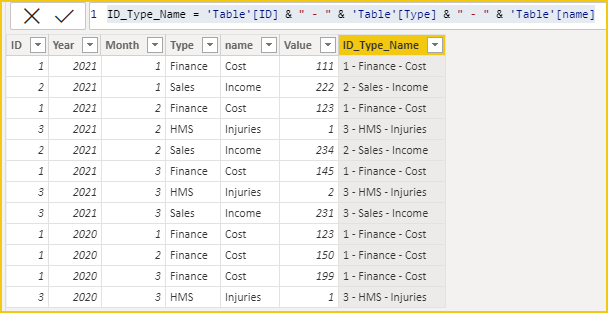
Then create these measures.
Value_YTD =
CALCULATE ( SUM ( 'Table'[Value] ), 'Table'[Year] = MAX ( 'Table'[Year] ) )Value_TP =
CALCULATE (
SUM ( 'Table'[Value] ),
FILTER (
'Table',
'Table'[Year] = MAX ( 'Table'[Year] )
&& 'Table'[Month] = MAX ( 'Table'[Month] )
)
)Value_LYTD =
CALCULATE ( SUM ( 'Table'[Value] ), 'Table'[Year] = MAX ( 'Table'[Year] ) - 1 )Value_LTP =
CALCULATE (
SUM ( 'Table'[Value] ),
FILTER (
'Table',
'Table'[Year] = MAX ( 'Table'[Year] ) - 1
&& 'Table'[Month] = MAX ( 'Table'[Month] )
)
)Diff_YTD(%) =
VAR _rate =
DIVIDE ( [Value_YTD] - [Value_LYTD], [Value_YTD] )
VAR _result =
IF ( [Value_LYTD] = BLANK (), BLANK (), _rate )
RETURN
_result
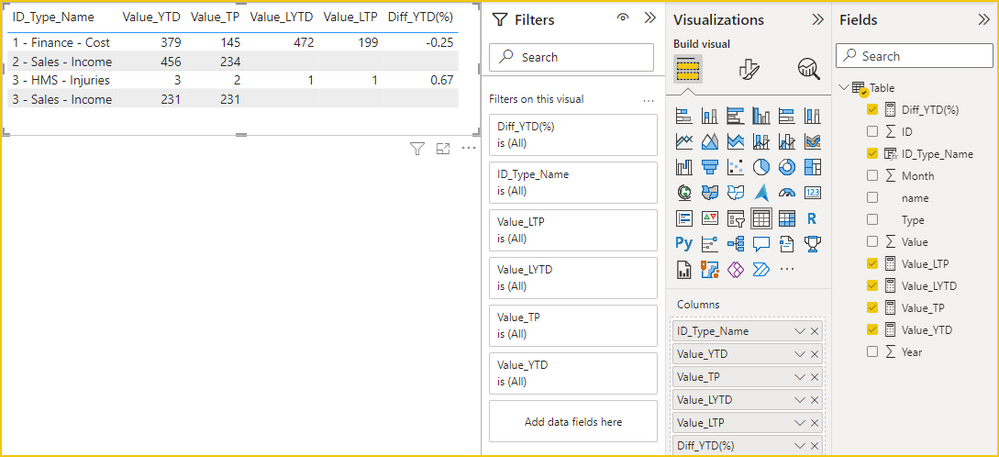
The PBIX file is attached for reference.
Best Regards,
Gao
Community Support Team
If there is any post helps, then please consider Accept it as the solution to help the other members find it more quickly. If I misunderstand your needs or you still have problems on it, please feel free to let us know. Thanks a lot!
How to get your questions answered quickly -- How to provide sample data
Hi @h4_dkj ,
Please consider taking calendar tables into account for future modeling so that more and more powerful time-intelligent functions can be used.
First create a new calculated column.
ID_Type_Name = 'Table'[ID] & " - " & 'Table'[Type] & " - " & 'Table'[name]
Then create these measures.
Value_YTD =
CALCULATE ( SUM ( 'Table'[Value] ), 'Table'[Year] = MAX ( 'Table'[Year] ) )Value_TP =
CALCULATE (
SUM ( 'Table'[Value] ),
FILTER (
'Table',
'Table'[Year] = MAX ( 'Table'[Year] )
&& 'Table'[Month] = MAX ( 'Table'[Month] )
)
)Value_LYTD =
CALCULATE ( SUM ( 'Table'[Value] ), 'Table'[Year] = MAX ( 'Table'[Year] ) - 1 )Value_LTP =
CALCULATE (
SUM ( 'Table'[Value] ),
FILTER (
'Table',
'Table'[Year] = MAX ( 'Table'[Year] ) - 1
&& 'Table'[Month] = MAX ( 'Table'[Month] )
)
)Diff_YTD(%) =
VAR _rate =
DIVIDE ( [Value_YTD] - [Value_LYTD], [Value_YTD] )
VAR _result =
IF ( [Value_LYTD] = BLANK (), BLANK (), _rate )
RETURN
_result
The PBIX file is attached for reference.
Best Regards,
Gao
Community Support Team
If there is any post helps, then please consider Accept it as the solution to help the other members find it more quickly. If I misunderstand your needs or you still have problems on it, please feel free to let us know. Thanks a lot!
How to get your questions answered quickly -- How to provide sample data
@h4_dkj everything you need is here:
https://www.daxpatterns.com/standard-time-related-calculations/
The Power BI Data Visualization World Championships is back! Get ahead of the game and start preparing now!
| User | Count |
|---|---|
| 13 | |
| 5 | |
| 5 | |
| 3 | |
| 3 |
| User | Count |
|---|---|
| 25 | |
| 10 | |
| 10 | |
| 6 | |
| 6 |