Join us at FabCon Atlanta from March 16 - 20, 2026, for the ultimate Fabric, Power BI, AI and SQL community-led event. Save $200 with code FABCOMM.
Register now!The Power BI Data Visualization World Championships is back! It's time to submit your entry. Live now!
Hi,
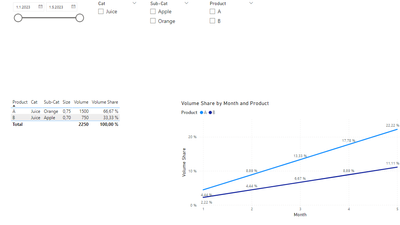
I have 3 tables - Calendar, Dimension & Fact table. I have 2 measures:- Volume = SUM(Sales[Volume]) &
I am using Volume Share measure in a table & line chart in a same page. I want to modify this measure such that when a user selects Product A, I want the line chart to show same value as when nothing is selected. Please refer to image.
Any guidance will be appreciated!
Thanks in advance!
Hi again,
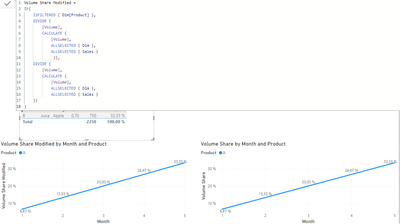
This logic that I derived from your measure works 😃
I think there is another simple way to do it but unless I can figure it out. This is fine. Refer to picture:
This works in test file but not in real. I must be missing something!
@RoshanK Hi!
Try with something like:
Volume Share Modified =
IF (
ISFILTERED ( Dim[Product] ),
DIVIDE ( [Volume], [Volume], 1 ),
DIVIDE (
[Volume],
CALCULATE ( [Volume], ALLSELECTED ( Dim ), ALLSELECTED ( Sales ) )
)
)
BBF
Hi @BeaBF,
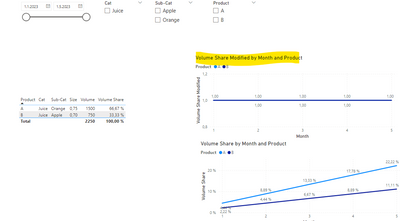
This doesn't work. Based on your measure, the line chart shows the same 100% value for all or no selection.
Thanks!
The Power BI Data Visualization World Championships is back! It's time to submit your entry.
Check out the January 2026 Power BI update to learn about new features.
| User | Count |
|---|---|
| 10 | |
| 5 | |
| 5 | |
| 3 | |
| 3 |
| User | Count |
|---|---|
| 19 | |
| 14 | |
| 9 | |
| 8 | |
| 8 |