cancel
Showing results for 
Search instead for 
Did you mean: 

The FabCon + SQLCon recap series starts April 14th at 8am Pacific. If you’re tracking where AI is going inside Fabric, this first session is a can't miss. Register now

Reply
XR043
Frequent Visitor

Calculate Average for a group with filters

Hello Experts,


I've struggled with these DAX for a while,  it should be easy but couldn't get the results I want. Hope to get your guidance on this.


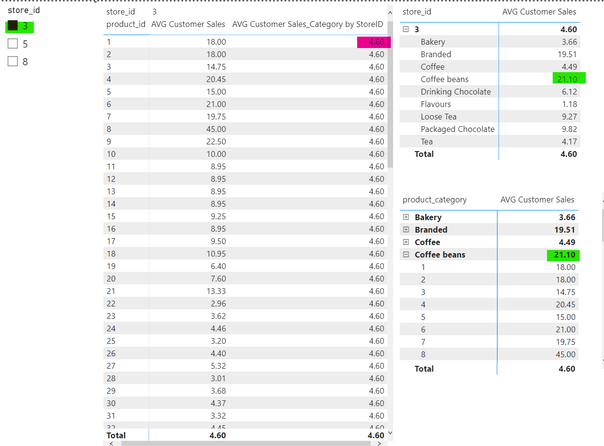
I want to be able to compare the average sales for a product and the average sales for the product category which the product belongs to and for the specific store that's been selected, so I guess I want to calculate: 

1. the average sales for each product (by product_id), and

2. the average sales for each product category (product_category) by different stores (store_id). The store_id could be added as a slicer 


What I tried:

AVG Customer Sales =
AVERAGEX('Sales by Store',
'Sales by Store'[quantity_sold] * 'Sales by Store'[unit_price])
 
AVG Customer Sales_Category by StoreID =
CALCULATE(
    [AVG Customer Sales],
    ALLEXCEPT('Sales by Store','Product Lookup'[product_category],'Sales by Store'[store_id])
)
 
 
However the snapshot below shows that I didnt actually achieve this. I think the AVG Customer Sales_Category by StoreID should show 21.10 which is the average for Coffee beans in Store 3, which the product (product_id =1) belongs to.
 
I was wondering if anyone can give me some ideas on what to do. Thank you.
XR043_3-1662278919501.png


1 ACCEPTED SOLUTION
m3tr01d
Continued Contributor

Hi @XR043,

First, I would try to see if your issue is solved by adding the Product_Category on your table on the left. There is a specific behavior when using ALLEXCEPT where if a column you are using in ALLEXCEPT is not preset in the filter context, it won't work.

In your use case, Product_Category is not explicitly present in the table so you won't be able to use ALLEXCEPT for that column. Hope it helps.

View solution in original post

3 REPLIES 3
m3tr01d
Continued Contributor

Hi @XR043,

First, I would try to see if your issue is solved by adding the Product_Category on your table on the left. There is a specific behavior when using ALLEXCEPT where if a column you are using in ALLEXCEPT is not preset in the filter context, it won't work.

In your use case, Product_Category is not explicitly present in the table so you won't be able to use ALLEXCEPT for that column. Hope it helps.

daXtreme
Solution Sage
Solution Sage

@XR043 


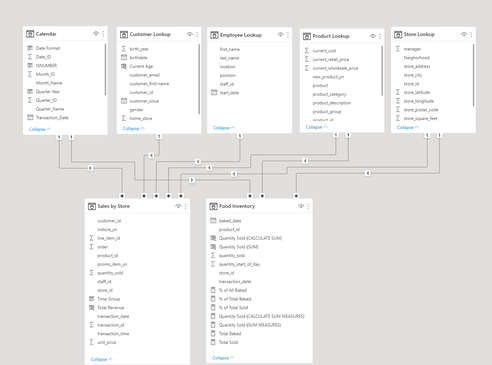
Can you please post a picture of your model?


Thanks.

Yep, here's the model:


XR043_0-1662280962201.png


Helpful resources

Announcements
New to Fabric survey Carousel

New to Fabric Survey

If you have recently started exploring Fabric, we'd love to hear how it's going. Your feedback can help with product improvements.

Power BI DataViz World Championships carousel

Power BI DataViz World Championships - June 2026

A new Power BI DataViz World Championship is coming this June! Don't miss out on submitting your entry.

Join our Fabric User Panel

Join our Fabric User Panel

Share feedback directly with Fabric product managers, participate in targeted research studies and influence the Fabric roadmap.

March Power BI Update Carousel

Power BI Community Update - March 2026

Check out the March 2026 Power BI update to learn about new features.