Hi,
I am quite new ti this forum but what I see this forum is a treasure! I hope I can find an answer to my question as well!
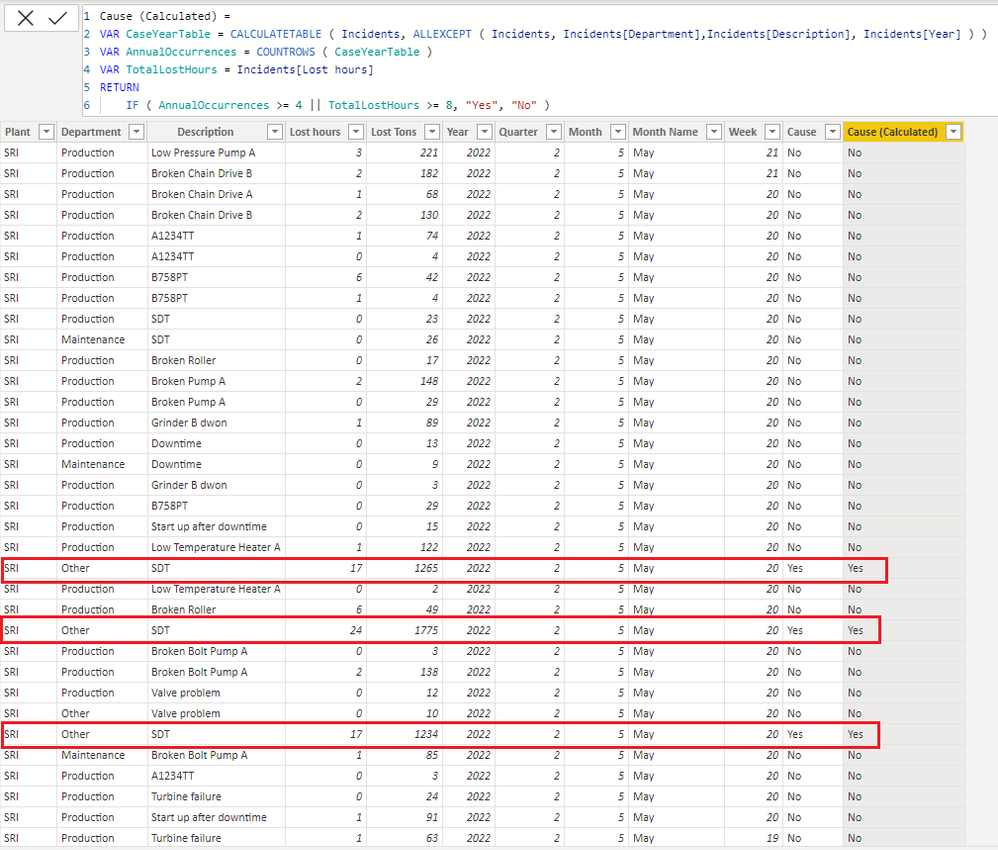
I am trying to solve my problem in power pivot by writing a measure; I have achieved to solve my problem actually using excel function but I want to solve it using dax and measure
In this data, there are years where problem occurred, event descriptions and finally lost hours.
As a rule, to call an event as a cause;
- Same event should happen 4 times or more in that year. In this case, total lost hours might be less than 8 hours
- Same event might happen less than 4 times in that year. In this case, total lost hours should be more than 8 hours
- Cause column is what I try to achive. I have achived by using following excel formula
- =IF(COUNTIFS(C:C,'UDT Analysis.xlsx'!#REF!,F:F,'UDT Analysis.xlsx'!#REF!)>3,"Yes",IF(SUMIFS(D:D,C:C,'UDT Analysis.xlsx'!#REF!,F:F,'UDT Analysis.xlsx'!#REF!)>7,"Yes","No"))
I will be so glad if you could help me to create a dax measure look similar to my excel formula. Thanks a lot for help and comments!
| Plant | Department | Description | Lost hours | Lost Tons | Year | Quarter | Month | Month Name | Week | Cause |
| SRI | Production | Low Pressure Pump A | 2,6 | 221 | 2022 | 2 | 5 | May | 21 | No |
| SRI | Production | Broken Chain Drive B | 2,1 | 182 | 2022 | 2 | 5 | May | 21 | No |
| SRI | Production | Broken Chain Drive A | 0,8 | 68 | 2022 | 2 | 5 | May | 20 | No |
| SRI | Production | Broken Chain Drive B | 1,5 | 130 | 2022 | 2 | 5 | May | 20 | No |
| SRI | Production | A1234TT | 0,9 | 74 | 2022 | 2 | 5 | May | 20 | No |
| SRI | Production | A1234TT | 0,1 | 4 | 2022 | 2 | 5 | May | 20 | No |
| SRI | Production | B758PT | 0,6 | 42 | 2022 | 2 | 5 | May | 20 | No |
| SRI | Production | B758PT | 0,1 | 4 | 2022 | 2 | 5 | May | 20 | No |
| SRI | Production | SDT | 0,3 | 23 | 2022 | 2 | 5 | May | 20 | No |
| SRI | Maintenance | SDT | 0,4 | 26 | 2022 | 2 | 5 | May | 20 | No |
| SRI | Production | Broken Roller | 0,2 | 17 | 2022 | 2 | 5 | May | 20 | No |
| SRI | Production | Broken Pump A | 2 | 148 | 2022 | 2 | 5 | May | 20 | No |
| SRI | Production | Broken Pump A | 0,4 | 29 | 2022 | 2 | 5 | May | 20 | No |
| SRI | Production | Grinder B dwon | 1 | 89 | 2022 | 2 | 5 | May | 20 | No |
| SRI | Production | Downtime | 0,2 | 13 | 2022 | 2 | 5 | May | 20 | No |
| SRI | Maintenance | Downtime | 0,1 | 9 | 2022 | 2 | 5 | May | 20 | No |
| SRI | Production | Grinder B dwon | 0 | 3 | 2022 | 2 | 5 | May | 20 | No |
| SRI | Production | B758PT | 0,3 | 29 | 2022 | 2 | 5 | May | 20 | No |
| SRI | Production | Start up after downtime | 0,2 | 15 | 2022 | 2 | 5 | May | 20 | No |
| SRI | Production | Low Temperature Heater A | 1,4 | 122 | 2022 | 2 | 5 | May | 20 | No |
| SRI | Other | Sdt | 17,1 | 1,265 | 2022 | 2 | 5 | May | 20 | Yes |
| SRI | Production | Low Temperature Heater A | 0 | 2 | 2022 | 2 | 5 | May | 20 | No |
| SRI | Production | Broken Roller | 0,6 | 49 | 2022 | 2 | 5 | May | 20 | No |
| SRI | Other | Sdt | 24 | 1,775 | 2022 | 2 | 5 | May | 20 | Yes |
| SRI | Production | Broken Bolt Pump A | 0 | 3 | 2022 | 2 | 5 | May | 20 | No |
| SRI | Production | Broken Bolt Pump A | 1,6 | 138 | 2022 | 2 | 5 | May | 20 | No |
| SRI | Production | Valve problem | 0,1 | 12 | 2022 | 2 | 5 | May | 20 | No |
| SRI | Other | Valve problem | 0,1 | 10 | 2022 | 2 | 5 | May | 20 | No |
| SRI | Other | SDT | 16,7 | 1,234 | 2022 | 2 | 5 | May | 20 | Yes |
| SRI | Maintenance | Broken Bolt Pump A | 1 | 85 | 2022 | 2 | 5 | May | 20 | No |
| SRI | Production | A1234TT | 0 | 3 | 2022 | 2 | 5 | May | 20 | No |
| SRI | Production | Turbine failure | 0,3 | 24 | 2022 | 2 | 5 | May | 20 | No |
| SRI | Production | Start up after downtime | 1,1 | 91 | 2022 | 2 | 5 | May | 20 | No |
| SRI | Production | Turbine failure | 0,7 | 63 | 2022 | 2 | 5 | May | 19 | No |
| SRI | Other | No power | 1,1 | 95 | 2022 | 2 | 5 | May | 19 | No |
| SRI | Other | No power | 0,9 | 78 | 2022 | 2 | 5 | May | 19 | No |