Join us at FabCon Atlanta from March 16 - 20, 2026, for the ultimate Fabric, Power BI, AI and SQL community-led event. Save $200 with code FABCOMM.
Register now!The Power BI Data Visualization World Championships is back! Get ahead of the game and start preparing now! Learn more
Table that shows answers for question of a people:
| _person.id_ | question_ | answer_ | gender |
| 1 | gender? | male | male |
| 1 | age? | 18 | male |
| 1 | married? | no | male |
| 2 | gender? | female | female |
| 2 | age? | 36 | female |
| 2 | married? | yes | female |
So, from 1 question we can now know the gender, but I need to see this person's gender in each row related to this person by his/her id. What's the formula for that? Thanks in advance!
Solved! Go to Solution.
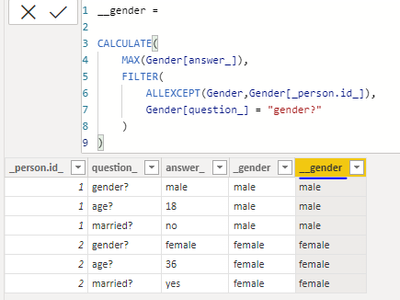
Hi @Anonymous ,
Here you go :
Kind regards,
Rohit
Please mark this answer as the solution if it resolves your issue.
Appreciate your kudos! 🙂
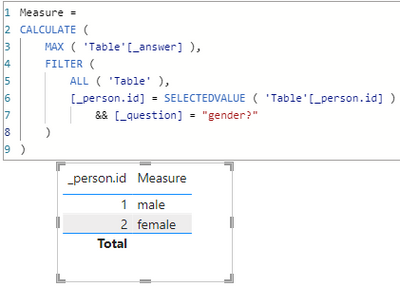
Hi, @Anonymous
You can try the following methods.
Measure:
Measure =
CALCULATE (
MAX ( 'Table'[_answer] ),
FILTER (
ALL ( 'Table' ),
[_person.id] = SELECTEDVALUE ( 'Table'[_person.id] )
&& [_question] = "gender?"
)
)
Column:
gender =
CALCULATE (
MAX ( 'Table'[_answer] ),
FILTER (
'Table',
[_person.id] = EARLIER ( 'Table'[_person.id] )
&& [_question] = "gender?"
)
)
Does it match the output you expect?
Best Regards,
Community Support Team _Charlotte
If this post helps, then please consider Accept it as the solution to help the other members find it more quickly.
Hi, @Anonymous
You can try the following methods.
Measure:
Measure =
CALCULATE (
MAX ( 'Table'[_answer] ),
FILTER (
ALL ( 'Table' ),
[_person.id] = SELECTEDVALUE ( 'Table'[_person.id] )
&& [_question] = "gender?"
)
)
Column:
gender =
CALCULATE (
MAX ( 'Table'[_answer] ),
FILTER (
'Table',
[_person.id] = EARLIER ( 'Table'[_person.id] )
&& [_question] = "gender?"
)
)
Does it match the output you expect?
Best Regards,
Community Support Team _Charlotte
If this post helps, then please consider Accept it as the solution to help the other members find it more quickly.
Hi @Anonymous ,
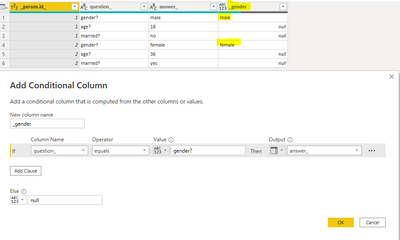
You can do this using Power Query.
In the first step, please add a conditional column as shown below :
You will see a new column added with gender values and nulls.
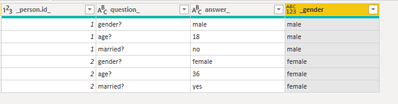
In the next step, click on the _gender column, go to "Transform" --> "Fill" --> ''Down"
This will give you the result as expected
Kind regards,
Rohit
Please mark this answer as the solution if it resolves your issue.
Appreciate your kudos! 🙂
I can't use edit query for this table, I need a dax code
Hi @Anonymous ,
Here you go :
Kind regards,
Rohit
Please mark this answer as the solution if it resolves your issue.
Appreciate your kudos! 🙂
Check out the November 2025 Power BI update to learn about new features.
Advance your Data & AI career with 50 days of live learning, contests, hands-on challenges, study groups & certifications and more!
| User | Count |
|---|---|
| 20 | |
| 10 | |
| 9 | |
| 4 | |
| 4 |
| User | Count |
|---|---|
| 33 | |
| 31 | |
| 19 | |
| 12 | |
| 11 |