FabCon is coming to Atlanta
Join us at FabCon Atlanta from March 16 - 20, 2026, for the ultimate Fabric, Power BI, AI and SQL community-led event. Save $200 with code FABCOMM.
Register now!- Power BI forums
- Get Help with Power BI
- Desktop
- Service
- Report Server
- Power Query
- Mobile Apps
- Developer
- DAX Commands and Tips
- Custom Visuals Development Discussion
- Health and Life Sciences
- Power BI Spanish forums
- Translated Spanish Desktop
- Training and Consulting
- Instructor Led Training
- Dashboard in a Day for Women, by Women
- Galleries
- Data Stories Gallery
- Themes Gallery
- Contests Gallery
- QuickViz Gallery
- Quick Measures Gallery
- Visual Calculations Gallery
- Notebook Gallery
- Translytical Task Flow Gallery
- TMDL Gallery
- R Script Showcase
- Webinars and Video Gallery
- Ideas
- Custom Visuals Ideas (read-only)
- Issues
- Issues
- Events
- Upcoming Events
The Power BI Data Visualization World Championships is back! Get ahead of the game and start preparing now! Learn more
- Power BI forums
- Forums
- Get Help with Power BI
- DAX Commands and Tips
- Re: Apply different formulas with parameters to di...
- Subscribe to RSS Feed
- Mark Topic as New
- Mark Topic as Read
- Float this Topic for Current User
- Bookmark
- Subscribe
- Printer Friendly Page

- Mark as New
- Bookmark
- Subscribe
- Mute
- Subscribe to RSS Feed
- Permalink
- Report Inappropriate Content
Apply different formulas with parameters to different rows
Hi Everyone!
Currenly I am in need of some help regarding the subject mentioned above.
I have the following example dataset which is named 'Totals' :
| Category | CategoryNumber | Amount | Formula it is supposed to have | |
| SalaryCosts | 1 | -100 | A | |
| SalaryCosts | 1 | -500 | A | |
| SalaryCosts | 1 | -900 | A | |
| SalaryCosts | 1 | -200 | A | |
| Revenue | 2 | 3600 | B | |
| Revenue | 2 | 18000 | B | |
| Revenue | 2 | 32400 | B | |
| TravelCosts | 3 | -5 | C | |
| TravelCosts | 3 | -25 | C |
The formula's that I hope to get linked to certain rows are as followed:
Formula A --> Adding Employees which causes an increase in employee related costs but not in revenue
Average(Totals[Amount]) * (Amount of employees + Parameter for more/less employees)
Formula B --> Adding orders which causes an increase in revenue but not in employee related costs
Average(Totals[Amount]) * (Amount of orders * Parameter % change for more/less orders)
Formula C --> Totals that are not influenced by the amount of employees/orders
SUM(Totals[Amount])
Eventually my goal is to plot a graph, and when you for example select 'SalaryCosts' the formula with the parameter gets plotted
I tried this in a Power BI measure, but it says it cannot find 'CategoryNumber':
I hope someone can help me out!
P.S. It is my first post, please don't hesitate to tell me how to make a post more clear
Solved! Go to Solution.
- Mark as New
- Bookmark
- Subscribe
- Mute
- Subscribe to RSS Feed
- Permalink
- Report Inappropriate Content
// Within measures you can't use naked columns,
// you have to wrap them in some kind of aggregation.
// Of course, this does not apply to iterators.
// Change the last bit of your formula (after return) to:

switch ( SELECTEDVALUE( Totals[CategoryNumber] ),
	1; A;
	2; B;
	C
)
However, this formula will (most likely) eagerly calculate all the measures, even though they are not needed. Please move the calculation of A, B, and C under the SWITCH to make it faster.
Best
D
- Mark as New
- Bookmark
- Subscribe
- Mute
- Subscribe to RSS Feed
- Permalink
- Report Inappropriate Content
// Within measures you can't use naked columns,
// you have to wrap them in some kind of aggregation.
// Of course, this does not apply to iterators.
// Change the last bit of your formula (after return) to:

switch ( SELECTEDVALUE( Totals[CategoryNumber] ),
	1; A;
	2; B;
	C
)
However, this formula will (most likely) eagerly calculate all the measures, even though they are not needed. Please move the calculation of A, B, and C under the SWITCH to make it faster.
Best
D
- Mark as New
- Bookmark
- Subscribe
- Mute
- Subscribe to RSS Feed
- Permalink
- Report Inappropriate Content
@Anonymous Great, thanks! I with both of your answers combined I will try to proceed building!
The first steps I made look promising


- Mark as New
- Bookmark
- Subscribe
- Mute
- Subscribe to RSS Feed
- Permalink
- Report Inappropriate Content
- Mark as New
- Bookmark
- Subscribe
- Mute
- Subscribe to RSS Feed
- Permalink
- Report Inappropriate Content
@amitchandak,Thank you for the reply.
As a rookie, it took me some time to figure out how to apply the formulas in the right way on my own dataset.
When I use the first link you posted it gives me the nice layers to drill down on which are useful, thank you for that.
Unfortunately I didn't find to find my exact solution yet.
Taking the link as example
In the example they use 'Country' as a layer, within that layer you have 'France, 'UK' and 'USA'.
On that layer I want to apply different formulas one for 'France', one for 'UK' and one for 'USA'.
Right now I only see:
Which seems like 'Sum values when it is in the country layer and it is a total', but not country/row specific
Is this possible at all?
Thanks!

- Mark as New
- Bookmark
- Subscribe
- Mute
- Subscribe to RSS Feed
- Permalink
- Report Inappropriate Content
HI @Anonymous ,
What is the datatype of the column CategoryNumber in your table? Is it Text or Number?
If it is text format, then modify part of your DAX as follows:
- Mark as New
- Bookmark
- Subscribe
- Mute
- Subscribe to RSS Feed
- Permalink
- Report Inappropriate Content
Hi @Pragati11 ,
Thank you for your response!
The datatype of the column CategoryNumber is a Number
Regarding your Note:
Does using a column instead of measure still give me the capability to keep it 'dynamic'?
I would like to use the formula's that are listed in VAR A,B and C to plot a graph and then see what the effects are(how the graph changes) when I slide the parameter for adding the employees/orders.
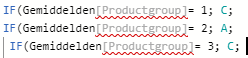
In addition, I just figured out to upload a picture in my post.
It currently shows this from my dataset(sorry for the different language, but it is from my original set.
With the message:
Thank you in advance!
Helpful resources

Power BI Dataviz World Championships
The Power BI Data Visualization World Championships is back! Get ahead of the game and start preparing now!

Power BI Monthly Update - November 2025
Check out the November 2025 Power BI update to learn about new features.

FabCon Atlanta 2026
Join us at FabCon Atlanta, March 16-20, for the ultimate Fabric, Power BI, AI and SQL community-led event. Save $200 with code FABCOMM.

| User | Count |
|---|---|
| 20 | |
| 11 | |
| 10 | |
| 4 | |
| 4 |


| User | Count |
|---|---|
| 34 | |
| 32 | |
| 19 | |
| 12 | |
| 10 |


