FabCon is coming to Atlanta
Join us at FabCon Atlanta from March 16 - 20, 2026, for the ultimate Fabric, Power BI, AI and SQL community-led event. Save $200 with code FABCOMM.
Register now!- Power BI forums
- Get Help with Power BI
- Desktop
- Service
- Report Server
- Power Query
- Mobile Apps
- Developer
- DAX Commands and Tips
- Custom Visuals Development Discussion
- Health and Life Sciences
- Power BI Spanish forums
- Translated Spanish Desktop
- Training and Consulting
- Instructor Led Training
- Dashboard in a Day for Women, by Women
- Galleries
- Data Stories Gallery
- Themes Gallery
- Contests Gallery
- QuickViz Gallery
- Quick Measures Gallery
- Visual Calculations Gallery
- Notebook Gallery
- Translytical Task Flow Gallery
- TMDL Gallery
- R Script Showcase
- Webinars and Video Gallery
- Ideas
- Custom Visuals Ideas (read-only)
- Issues
- Issues
- Events
- Upcoming Events
Get Fabric Certified for FREE during Fabric Data Days. Don't miss your chance! Request now
- Power BI forums
- Forums
- Get Help with Power BI
- DAX Commands and Tips
- Re: Aging balnace for customer
- Subscribe to RSS Feed
- Mark Topic as New
- Mark Topic as Read
- Float this Topic for Current User
- Bookmark
- Subscribe
- Printer Friendly Page


- Mark as New
- Bookmark
- Subscribe
- Mute
- Subscribe to RSS Feed
- Permalink
- Report Inappropriate Content
Aging balnace for customer
Hello,
I am a beginner.
Can't create an aging balance customer.
example:
| Customer | Total balance | Age balance<0 days | Age balance>0 days | Age balance 0-15 days | Age balance 16-30 days | Age balance 31-45 days | Age balance 49-999 days |
Slicer:
year
month
day
thanks
Arturas
Solved! Go to Solution.

- Mark as New
- Bookmark
- Subscribe
- Mute
- Subscribe to RSS Feed
- Permalink
- Report Inappropriate Content
Hi @Sarutra
Try it
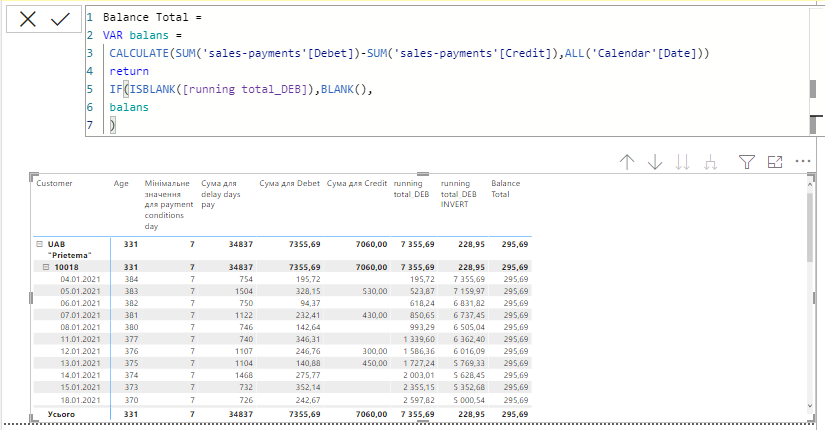
Balance Total =
VAR balans =
 CALCULATE(SUM('sales-payments'[Debet])-SUM('sales-payments'[Credit]),ALL('Calendar'[Date]))
 return
 IF(ISBLANK([running total_DEB]),BLANK(),
 balans
 )
__________________________________________
Thank you for your like and decision
__________________________________________
Greetings from Ukraine
To help me grow PayPal: embirddima@gmail.com
- Mark as New
- Bookmark
- Subscribe
- Mute
- Subscribe to RSS Feed
- Permalink
- Report Inappropriate Content
Hello,
a big thank you, its work
Arturas
- Mark as New
- Bookmark
- Subscribe
- Mute
- Subscribe to RSS Feed
- Permalink
- Report Inappropriate Content
Hello,
I updated the file
calculate


- Mark as New
- Bookmark
- Subscribe
- Mute
- Subscribe to RSS Feed
- Permalink
- Report Inappropriate Content
Hi @Sarutra. I looked at your file, and you're right: you can't create an aging balance for customers because your data is incomplete. With an A/R againg analysis, you take all outstanding invoices and determine how old they are. Unfortunately you can't determine which invoices are outstanding or not. You would need to have some kind of status on invoices that indicates "paid" or "not paid" in order to do this correctly.
Good luck!
- Mark as New
- Bookmark
- Subscribe
- Mute
- Subscribe to RSS Feed
- Permalink
- Report Inappropriate Content
- Mark as New
- Bookmark
- Subscribe
- Mute
- Subscribe to RSS Feed
- Permalink
- Report Inappropriate Content
Hi @Sarutra
Try it
Balance Total =
VAR balans =
 CALCULATE(SUM('sales-payments'[Debet])-SUM('sales-payments'[Credit]),ALL('Calendar'[Date]))
 return
 IF(ISBLANK([running total_DEB]),BLANK(),
 balans
 )
__________________________________________
Thank you for your like and decision
__________________________________________
Greetings from Ukraine
To help me grow PayPal: embirddima@gmail.com
- Mark as New
- Bookmark
- Subscribe
- Mute
- Subscribe to RSS Feed
- Permalink
- Report Inappropriate Content
Hi,
- Mark as New
- Bookmark
- Subscribe
- Mute
- Subscribe to RSS Feed
- Permalink
- Report Inappropriate Content
@Sarutra I apologize for not expanding on this earlier, but I'd like to explain why the first out, first paid model doesn't quite work.
Picture you credit card bill...
| Date | Vendor | Amount | Description |
| 2-Jan | Apple | $30 | Apple Music, iCloud |
| 3-Jan | McDonalds | $8.50 | Breakfast |
| 4-Jan | McDonalds | $8.50 | Breakfast |
| 5-Jan | ABT | $1,200 | Dryer |
| 6-Jan | McDonalds | $8.50 | Breakfast |
| 7-Jan | McDonalds | $8.50 | Breakfast |
| 8-Jan | Drizzly | $40 | Friday booze |
Except you didn't order a dryer from ABT on January 5th. You're not going to pay that.
It's no different for for employer/client. They're going to want matching of Purchase Order, Proof of Delivery and Invoice. If you're simply paying down oldest invoice first without regard to whether that invoice is approved for payment, it's not going to be received well.
You need to have some kind of indicator for specific invoices and approved for payment. It's not quite as simple as the proposed solution suggests.
I have a degree in accounting so I know what I'm talking about 😉

Helpful resources

Power BI Monthly Update - November 2025
Check out the November 2025 Power BI update to learn about new features.

Fabric Data Days
Advance your Data & AI career with 50 days of live learning, contests, hands-on challenges, study groups & certifications and more!

FabCon Atlanta 2026
Join us at FabCon Atlanta, March 16-20, for the ultimate Fabric, Power BI, AI and SQL community-led event. Save $200 with code FABCOMM.

| User | Count |
|---|---|
| 11 | |
| 9 | |
| 9 | |
| 6 | |
| 6 |


| User | Count |
|---|---|
| 26 | |
| 22 | |
| 19 | |
| 17 | |
| 10 |


