Join us at FabCon Atlanta from March 16 - 20, 2026, for the ultimate Fabric, Power BI, AI and SQL community-led event. Save $200 with code FABCOMM.
Register now!The Power BI Data Visualization World Championships is back! Get ahead of the game and start preparing now! Learn more
Hi,
I'm fairly new to DAX, and have been fighting with this problem for days now, also trying to find a solution on the internet.
I think that this problem is probably quite easy and I'm just thinking too complicated.
Basically I have a "Sales" table, that has invoices on invoice item level, like so:
| Invoice | Artikle | Value |
| A | XX | 20 |
| A | YY | 10 |
| A | Shipping | 5 |
| B | ZZ | 5 |
| B | XX | 20 |
| B | Shipping | 5 |
| C | ZZ | 5 |
| C | YY | 10 |
| C | Shipping | 5 |
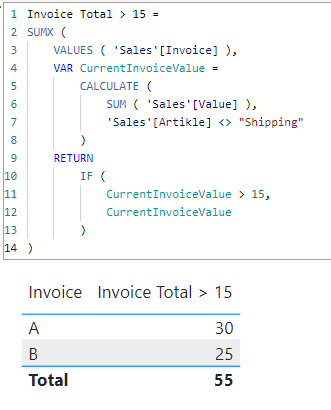
I want to aggregate the invoice total, but without shipping cost (product cost only), and then show the product cost of all invoices above/below a certain values. i.e. Show the total (without shipping) of all invoices with a product value of > 15. Which here would be 55 (=30 from A and 25 from B).
I've started by creating a measure for the total without shipping, but then fail to use it as a filter:
Total_product_cost_belowX =
var ProductCost = CALCULATE(SUMX(VALUES(Sales[Invoice]),Sales[Value]),Sales[Artikle] <>"Shipping") // works
from here...?
Thanks a lot in advance!
Solved! Go to Solution.
@nuclePBI
Please find attached sample file with the solution
Invoice Total > 15 =
SUMX (
VALUES ( 'Sales'[Invoice] ),
VAR CurrentInvoiceValue =
CALCULATE (
SUM ( 'Sales'[Value] ),
'Sales'[Artikle] <> "Shipping"
)
RETURN
IF (
CurrentInvoiceValue > 15,
CurrentInvoiceValue
)
)
Hi @nuclePBI
When you say "of all invoices with a product value of > 15." what do you exactly mean? Please clarify.
Hi tamerj1, each invoice has in the article column real products (XX, YY, ZZ..) but also an item "shipping".
With product value I mean the invoice total minus the shipping cost.
So for invoice A the invoice total would be 35, but the product value is only 30.
Important: I can't just hard code to substract 5, as shipping costs are different in my real world application.
Hope that clarifies it.
Best, nuclePBI
@nuclePBI
Please find attached sample file with the solution
Invoice Total > 15 =
SUMX (
VALUES ( 'Sales'[Invoice] ),
VAR CurrentInvoiceValue =
CALCULATE (
SUM ( 'Sales'[Value] ),
'Sales'[Artikle] <> "Shipping"
)
RETURN
IF (
CurrentInvoiceValue > 15,
CurrentInvoiceValue
)
)
One approach would be to create a summary table in the model, e.g.
Invoice Summary =
ADDCOLUMNS (
DISTINCT ( 'Table'[Invoice] ),
"Sales amount", [Total_product_cost_belowX]
)
You could then create measures and filters against this new table.
Check out the November 2025 Power BI update to learn about new features.
Advance your Data & AI career with 50 days of live learning, contests, hands-on challenges, study groups & certifications and more!
| User | Count |
|---|---|
| 20 | |
| 10 | |
| 9 | |
| 4 | |
| 4 |
| User | Count |
|---|---|
| 33 | |
| 31 | |
| 19 | |
| 12 | |
| 11 |