Get certified for free when you join Fabric Data Days 2026 and dive into Fabric, Power BI, SQL, AI, and other essential data skills.
Join nowTry your skills in the Power BI Dataviz World Championship! Round one ends June 26. Join now
Hello, I'm having some trouble puting a formula together to add a column that will return Sub Account 12345 for the first row in the table below. The account number for the department that needs to be replaced will always be 236.
| Account | Sub Account | Invoice Number | Amount |
| 236 | 00000 | 5555 | -10 |
| 526 | 12345 | 5555 | 20 |
| 205 | 00000 | 5555 | 30 |
Solved! Go to Solution.
Hi @JSData
You can create a new column:
Column = var a=FILTER('Table',[Invoice Number]=EARLIER('Table'[Invoice Number]))
return IF([Amount]>0,[Sub Account],MAXX(a,[Sub Account]))
Best Regards!
Yolo Zhu
If this post helps, then please consider Accept it as the solution to help the other members find it more quickly.
Hi @JSData
You can create a new column:
Column = var a=FILTER('Table',[Invoice Number]=EARLIER('Table'[Invoice Number]))
return IF([Amount]>0,[Sub Account],MAXX(a,[Sub Account]))
Best Regards!
Yolo Zhu
If this post helps, then please consider Accept it as the solution to help the other members find it more quickly.
hi @JSData
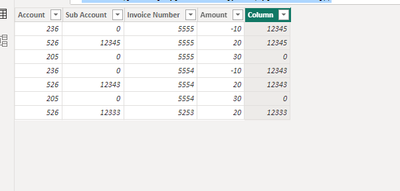
I have to apolgize I did not put enough detail in my orignal post. Your solution will work if it's only one replacement. The problem I'm working on is for each invoice number that has this account number I need to correct subaccount to be assigned to that account. I've put an expanded table with a desired result column that hopefully explains this more clearly. Again I apologize for being unclear the first time.
| Account | Sub Account | Invoice Number | Amount | Desired result |
| 236 | 00000 | 5555 | -10 | 12345 |
| 526 | 12345 | 5555 | 20 | 12345 |
| 205 | 00000 | 5555 | 30 | 00000 |
| 236 | 00000 | 5554 | -10 | 12343 |
| 526 | 12343 | 5554 | 20 | 12343 |
| 205 | 00000 | 5554 | 30 | 00000 |
| 526 | 12333 | 5253 | 20 | 12333 |
Don't miss out on Data Days, June 15 through August 7. Learn Fabric, Power BI, SQL, AI and more.
Check out the May 2026 Power BI update to learn about new features.
| User | Count |
|---|---|
| 3 | |
| 2 | |
| 2 | |
| 2 | |
| 1 |
| User | Count |
|---|---|
| 6 | |
| 4 | |
| 3 | |
| 3 | |
| 3 |