Join us at FabCon Atlanta from March 16 - 20, 2026, for the ultimate Fabric, Power BI, AI and SQL community-led event. Save $200 with code FABCOMM.
Register now!The Power BI Data Visualization World Championships is back! Get ahead of the game and start preparing now! Learn more
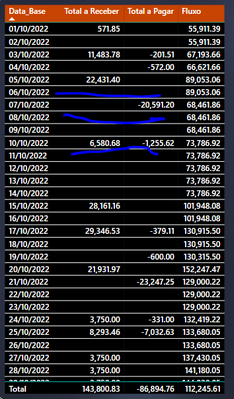
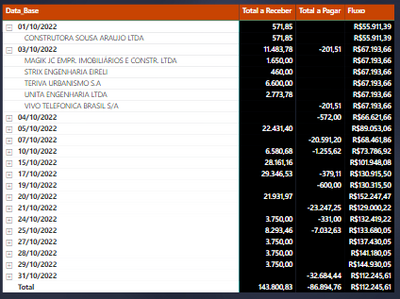
Hello, I managed to solve a problem using the ALLSELECTED() function, but now the array has a lot of blank lines, how can I remove it?
By the filters I can't, since if I filter a column it excludes the value of the others.
Solved! Go to Solution.
Hi,
Could you please try the below whether it suits your requirement?
Fluxo =
IF (
[Total a receber measure] <> BLANK ()
&& [Tltal a pagar measure] <> BLANK (),
CALCULATE (
[Total Fluxo] + [Total Saldo Bancário],
FILTER (
ALLSELECTED ( 'D-Pagar + Receber' ),
'D-Pagar + Receber'[Data] <= MAX ( 'BA-Data'[Data_Base] )
)
)
)
Hi,
Could you please try the below whether it suits your requirement?
Fluxo =
IF (
[Total a receber measure] <> BLANK ()
&& [Tltal a pagar measure] <> BLANK (),
CALCULATE (
[Total Fluxo] + [Total Saldo Bancário],
FILTER (
ALLSELECTED ( 'D-Pagar + Receber' ),
'D-Pagar + Receber'[Data] <= MAX ( 'BA-Data'[Data_Base] )
)
)
)
Thanks for your @Jihwan_Kim solution.
I just needed to change the "&&" operator to "||" and it worked perfectly.
Thanks a lot for the solution.
Hi, @Shaurya
These blank values are traditional when I use ALLSELECTED(), the filter needs to be applied within the measure itself to work. I've tried to use all the filters, I only have the measure, but I'm not getting it.
Hi @Anonymous,
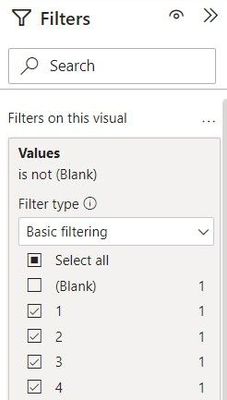
Why don't you try using the filters? Select all values first and just uncheck Blank.
Works for you? Mark this post as a solution if it does!
The Power BI Data Visualization World Championships is back! Get ahead of the game and start preparing now!
| User | Count |
|---|---|
| 14 | |
| 7 | |
| 4 | |
| 4 | |
| 3 |
| User | Count |
|---|---|
| 25 | |
| 10 | |
| 10 | |
| 6 | |
| 6 |