


Don't miss your chance to take exam DP-600 or DP-700 on us!
Request nowLearn from the best! Meet the four finalists headed to the FINALS of the Power BI Dataviz World Championships! Register now
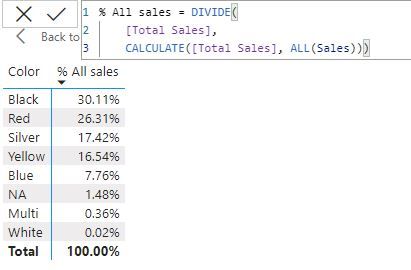
Hello, I have a question about using ALL and REMOVEFILTERS functions. Here you can see the perecentage of sales using those two functions and the results are the same. So, which one is the correct way to calculate?
Solved! Go to Solution.
@Alex_Hasan this is not something I can really explain in a post message here 🙂
Basically when you want to remove filters through calculate (like in your example) then you can use each one. It's the same.
When you want to create a table for some purpose that has all the values regardless of filters, then you use ALL.
Check out these 2 videos:
https://www.youtube.com/watch?v=GIP5dzBmUxc&t=2s
https://www.sqlbi.com/tv/removefilters-dax-guide/
When using inside calculate there is not much difference .Also there is some context behind why the REMOVEFILTERS function was introduced.If i try to explain it here the blog will become too lengthy .See this video till the end ,Hope things become more clearer !
Cheers !
@Alex_Hasan As a 2nd argument in calculate (the way you used it in your example) there is no difference at all 🙂
ALL can aslo be used as Table funciton where REMOVEFILTERS has only the calculate modifier role. (ALL can do both).
REMOVEFILTERS was added few years back to make it more understandable instad writing ALL there in the calculate modifer scenarios.
Hi @SpartaBI , could you please elaborate when to use ALL and when to use Removefilters?
@Alex_Hasan this is not something I can really explain in a post message here 🙂
Basically when you want to remove filters through calculate (like in your example) then you can use each one. It's the same.
When you want to create a table for some purpose that has all the values regardless of filters, then you use ALL.
Check out these 2 videos:
https://www.youtube.com/watch?v=GIP5dzBmUxc&t=2s
https://www.sqlbi.com/tv/removefilters-dax-guide/
Share feedback directly with Fabric product managers, participate in targeted research studies and influence the Fabric roadmap.
Check out the February 2026 Power BI update to learn about new features.
| User | Count |
|---|---|
| 6 | |
| 4 | |
| 3 | |
| 3 | |
| 2 |
| User | Count |
|---|---|
| 7 | |
| 7 | |
| 6 | |
| 6 | |
| 5 |