This time we’re going bigger than ever. Fabric, Power BI, SQL, AI and more. We're covering it all. You won't want to miss it.
Learn moreJoin the FabCon + SQLCon recap series. Up next: Power BI, Real-Time Intelligence, IQ and AI, and Data Factory take center stage. All sessions are available on-demand after the live show. Register now
Hello, in BI Desktop my graphics and cards have the correct visual and classification filters, when I publish lose those filters and ratings, why? i noticed that when I do the navigation by button occurs the mentioned above, when I navigate through the tabs does not occur. the problem still persists
Hello,
What type of publishing you mean, load into service? What version of desktop? We need more details that clearly understand your issue.
Kind Regards,
Evgenii Elkin,
Software Engineer
Microsoft Power BI Custom Visuals
pbicvsupport@microsoft.com
mine is the latest version 2.69.5467.1751 (may 2019)
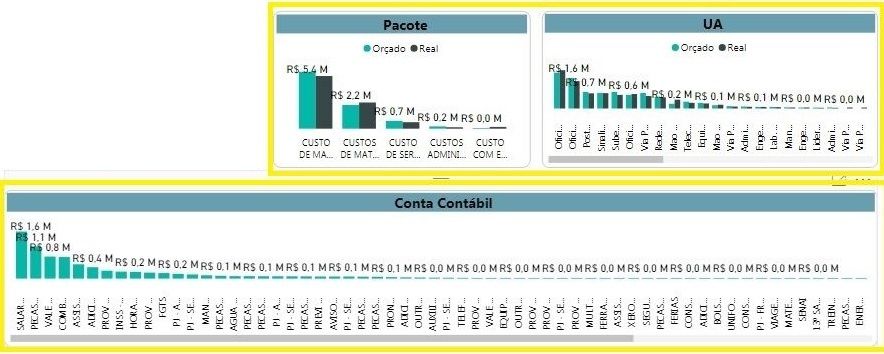
in the firt image in bi desktop the yellow squares is ok, with descending classificate.
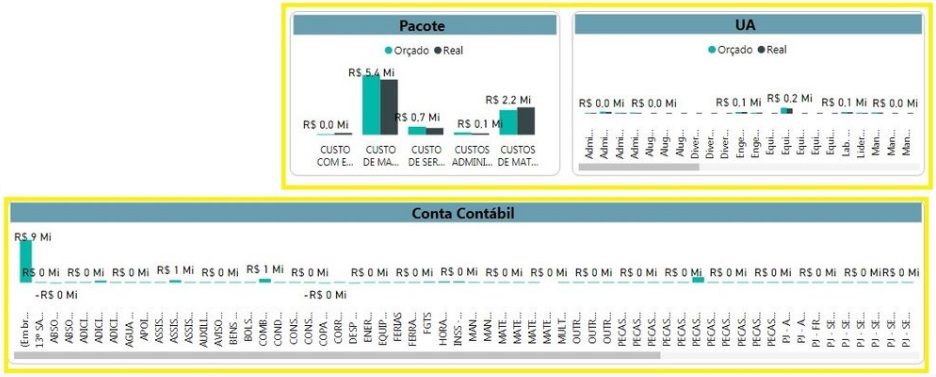
when i public it, the second image, i lose the classification in yellow square.
bi desktop
bi published
Do you mean that it happens when you click "File -> Publish -> Publish to Power BI"?
If so, could you please send us your report to pbicvsupport@microsoft.com for analysis?
Kind Regards,
Evgenii Elkin,
Software Engineer
Microsoft Power BI Custom Visuals
pbicvsupport@microsoft.com
hi. ok, sended
Check out the April 2026 Power BI update to learn about new features.
If you have recently started exploring Fabric, we'd love to hear how it's going. Your feedback can help with product improvements.
A new Power BI DataViz World Championship is coming this June! Don't miss out on submitting your entry.
| User | Count |
|---|---|
| 4 | |
| 3 | |
| 2 | |
| 2 | |
| 2 |