Join us at FabCon Atlanta from March 16 - 20, 2026, for the ultimate Fabric, Power BI, AI and SQL community-led event. Save $200 with code FABCOMM.
Register now!Learn from the best! Meet the four finalists headed to the FINALS of the Power BI Dataviz World Championships! Register now
Hello, in BI Desktop my graphics and cards have the correct visual and classification filters, when I publish lose those filters and ratings, why? i noticed that when I do the navigation by button occurs the mentioned above, when I navigate through the tabs does not occur. the problem still persists
Hello,
What type of publishing you mean, load into service? What version of desktop? We need more details that clearly understand your issue.
Kind Regards,
Evgenii Elkin,
Software Engineer
Microsoft Power BI Custom Visuals
pbicvsupport@microsoft.com
mine is the latest version 2.69.5467.1751 (may 2019)
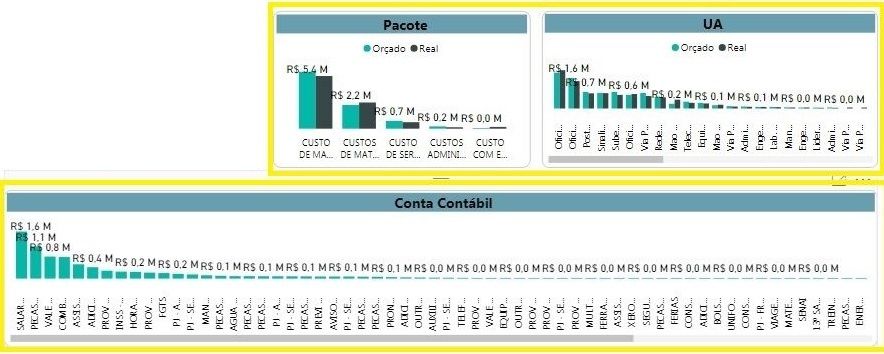
in the firt image in bi desktop the yellow squares is ok, with descending classificate.
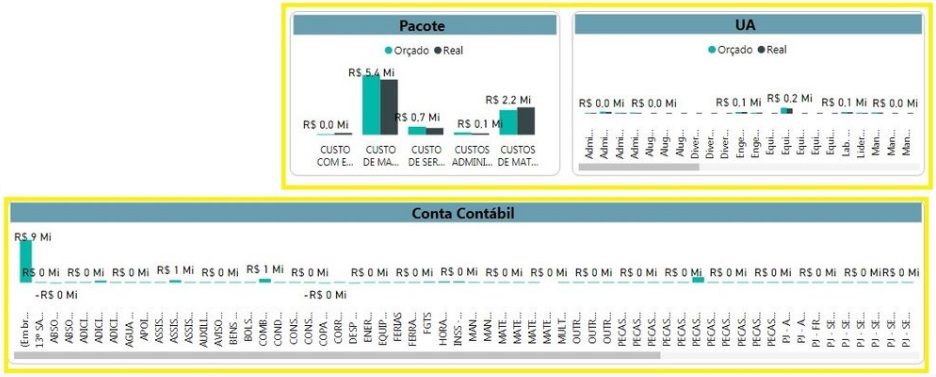
when i public it, the second image, i lose the classification in yellow square.
bi desktop
bi published
Do you mean that it happens when you click "File -> Publish -> Publish to Power BI"?
If so, could you please send us your report to pbicvsupport@microsoft.com for analysis?
Kind Regards,
Evgenii Elkin,
Software Engineer
Microsoft Power BI Custom Visuals
pbicvsupport@microsoft.com
hi. ok, sended
Share feedback directly with Fabric product managers, participate in targeted research studies and influence the Fabric roadmap.
Check out the February 2026 Power BI update to learn about new features.