cancel
Showing results for 
Search instead for 
Did you mean: 

Learn from the best! Meet the four finalists headed to the FINALS of the Power BI Dataviz World Championships! Register now

Reply
Anonymous
Not applicable

dataviewmapping dataReductionAlgorithm not increasing number of rows inputted


  "dataViewMappings": [
    {

      "table": {
        "rows": {
          "select": [
            {
              "for": {
                "in": "column"
              }
            },
            {
              "for": {
                "in": "value"

              }
            },
            {
              "for": {
                "in": "value2"

              }
            },
            {
              "for": {
                "in": "value3"

              }
            },
            {
              "for": {
                "in": "value4"

              }
            },
            {
              "for": {
                "in": "value5"

              }
            },
            {
              "for": {
                "in": "value6"

              }
            }
          ]
        },
        "dataReductionAlgorithm": {
          "top": {
            "count": 30000
          }
        }
      }

    }
  ]


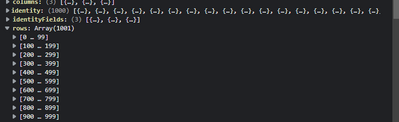
Ive added a datareduction to the first 30,000 but the visual still only brings in the first 1000 rows

IraWatt_0-1650731429140.png

Any thoughts to why are greatly appreciated


1 ACCEPTED SOLUTION
ripach
New Member

Hi,

the dataReductionAlgorithm-setting should be applied to the rows object, not to the whole table (see https://docs.microsoft.com/de-de/power-bi/developer/visuals/dataview-mappings#data-reduction-algorit... there is also an example for tables at the bottom). Try moving it inside the rows object:

"dataViewMappings": [
    {
      "table": {
        "rows": {
          "select": [
            ....
          ],
          "dataReductionAlgorithm": {
            "top": {
              "count": 30000
            }
          }
        }
      }
    }
  ]

Best regards,

Robert

View solution in original post

2 REPLIES 2
ripach
New Member

Hi,

the dataReductionAlgorithm-setting should be applied to the rows object, not to the whole table (see https://docs.microsoft.com/de-de/power-bi/developer/visuals/dataview-mappings#data-reduction-algorit... there is also an example for tables at the bottom). Try moving it inside the rows object:

"dataViewMappings": [
    {
      "table": {
        "rows": {
          "select": [
            ....
          ],
          "dataReductionAlgorithm": {
            "top": {
              "count": 30000
            }
          }
        }
      }
    }
  ]

Best regards,

Robert

Anonymous
Not applicable

Ah great spot thanks @ripach !

Helpful resources

Announcements
Join our Fabric User Panel

Join our Fabric User Panel

Share feedback directly with Fabric product managers, participate in targeted research studies and influence the Fabric roadmap.

March Power BI Update Carousel

Power BI Community Update - March 2026

Check out the March 2026 Power BI update to learn about new features.

Top Solution Authors