Get certified for free when you join Fabric Data Days 2026 and dive into Fabric, Power BI, SQL, AI, and other essential data skills.
Join nowTry your skills in the Power BI Dataviz World Championship! Round one ends June 26. Join now
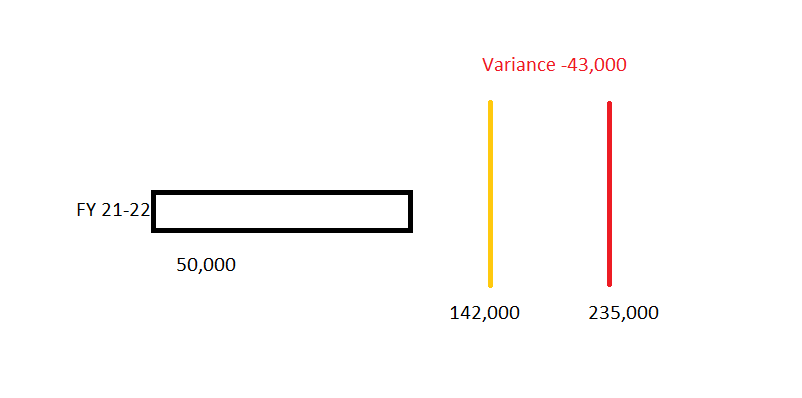
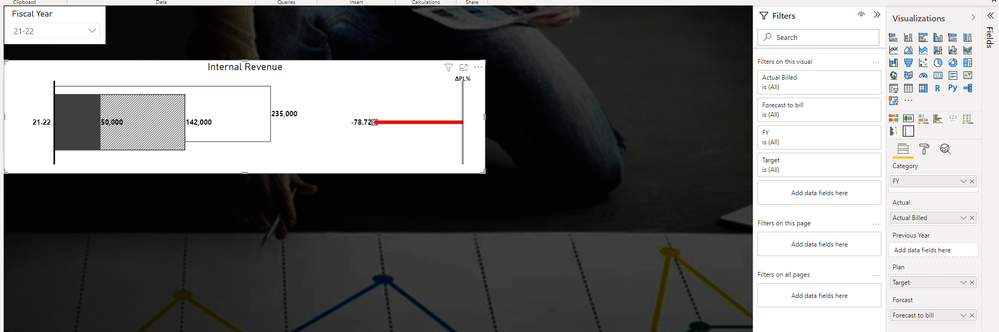
Hi All, I need a help in variance chart. Customer is asking for the first visualization and i was able to produce the 2nd one with the custom visualization "Barchart with relative variance". The problem with it or any other variance chart i am using is the variance isn't being calculated the way customer is wanting. Customers variance formula is variance=(forecast+Actual)- target. and the visualiation should ideally contain two vertical lines(target and forecasted) and one bar (actual). if the variance is negative, text should be red and if positivem text should be green
Customer Ask
pbi custom visual
| FY | Target | Actual Billed | Forecast to Bill | Variance |
| 21-22 | 235,000 | 50,000 | 142,000 | -43,000 |
This looks like a great opportunity for you to learn about the Deneb visual.
The Deneb suggestion works for the custom chart visual. For the table/matrix side of the same report (showing the variance numbers per vendor alongside the chart), Flexa Tables on AppSource might be simpler, it supports custom variance formulas and conditional formatting (red/green) as built-in options without custom Vega specs.
If the goal is purely the chart visual, Deneb is the right tool. If you also need a variance table that Finance users can explore themselves, Flexa Tables is worth a look. Search "Flexa Tables" on AppSource.
| User | Count |
|---|---|
| 1 | |
| 1 | |
| 1 | |
| 1 | |
| 1 |