Join us at FabCon Atlanta from March 16 - 20, 2026, for the ultimate Fabric, Power BI, AI and SQL community-led event. Save $200 with code FABCOMM.
Register now!Learn from the best! Meet the four finalists headed to the FINALS of the Power BI Dataviz World Championships! Register now
Hello,
This is what I encounter when using ring chart by maq software.
1. The use of the color on the theme wont follow by the ring chart when you use it on two sheets.
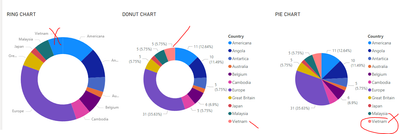
This image shows that the two visuals colors are matching. But let say a new data comes in for the country Vietnam. See what will happen to the color in the ring chart.
So the color of vietnam now wont match, it uses the 1st color of the theme. Unlike the original visuals in power bi colors will matched.
I there for conclude that there is something wrong in this visuals, that you have to do it manually. Automation part is not going to be applicable on this visual.
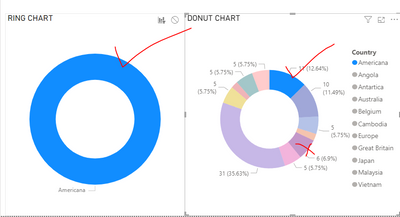
Also it happens to me that even you select any colors in the donut chart the default color of that ring chart is the 1st color in the theme.
Share feedback directly with Fabric product managers, participate in targeted research studies and influence the Fabric roadmap.
Check out the February 2026 Power BI update to learn about new features.