cancel
Showing results for 
Search instead for 
Did you mean: 

We've captured the moments from FabCon & SQLCon that everyone is talking about, and we are bringing them to the community, live and on-demand. Starts on April 14th. Register now

Reply
Juliet1
Frequent Visitor

Progress Chart

Hello everyone. 

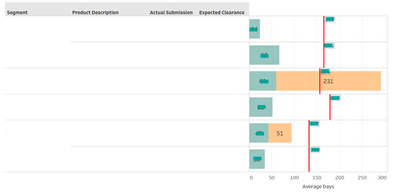
I need your help to build a chart similar to the one below, the idea is to show in columns (Axis Y) information of the process, in the bars the number of days in each of the steps and compare the total with a target. Right now there are displaying 2 steps (Green and Orange) but they could be more.


Juliet1_0-1666365879785.png

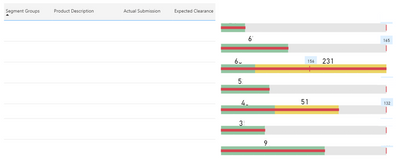
So far I have try with a bullet chart but it doesnt allow to:

  • Include different  data in columns in the axis Y (I had to include a table in the left side)
  • Display targets in different location depending the value
  • Include numbers in the bar that shows the number of days in each step of the process (I add them manually) 

Juliet1_1-1666366867307.png


Hope you can help me!!!

3 REPLIES 3
lbendlin
Super User
Super User

Have you considered creating your own visual with Deneb or Charticulator?

Hi Ibendlin


I have never try to create my on chart, do you have any advise that will help me to start? I do not know Deneb or Charliculator I will do some research.


Thanks 🙂

Helpful resources

Announcements
New to Fabric survey Carousel

New to Fabric Survey

If you have recently started exploring Fabric, we'd love to hear how it's going. Your feedback can help with product improvements.

Power BI DataViz World Championships carousel

Power BI DataViz World Championships - June 2026

A new Power BI DataViz World Championship is coming this June! Don't miss out on submitting your entry.

Join our Fabric User Panel

Join our Fabric User Panel

Share feedback directly with Fabric product managers, participate in targeted research studies and influence the Fabric roadmap.

March Power BI Update Carousel

Power BI Community Update - March 2026

Check out the March 2026 Power BI update to learn about new features.

Top Solution Authors