cancel
Showing results for 
Search instead for 
Did you mean: 

Learn from the best! Meet the four finalists headed to the FINALS of the Power BI Dataviz World Championships! Register now

Reply
Wolfgang007
New Member

Power Automate cannot be removed from Visuals

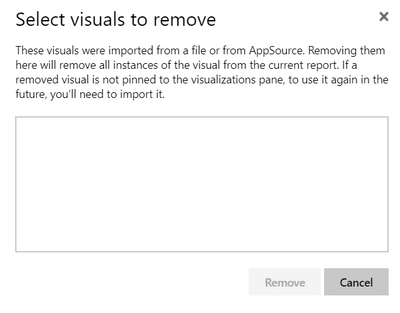
I try to remove Power Automate Wolfgang007_0-1659527902838.jpeg  from my visuals but I am not able to do so.

I may unpin it, but it is not shown to be removed.


The remove list is empty.

Wolfgang007_3-1659528033533.png


Wolfgang007_2-1659527977138.jpeg


2 ACCEPTED SOLUTIONS
lbendlin
Super User
Super User

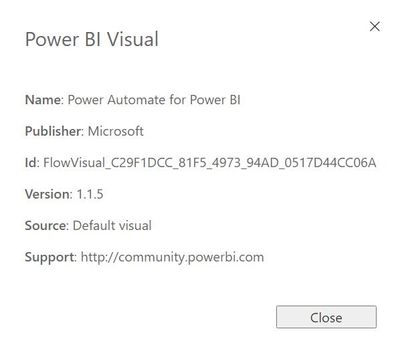
It has been ugraded from custom to default visual many months ago. You can no longer remove it.

View solution in original post

Wolfgang007
New Member

Thanks for your hint. I was already wondering why I could not delete this.


But my PowerBI server environment was not on this level as well, as it was always blaming this visual which I needed to delete.
I therefore deleted the visual directly in the 7-zip presentation of the pbix file, which worked out finally.

View solution in original post

2 REPLIES 2
Wolfgang007
New Member

Thanks for your hint. I was already wondering why I could not delete this.


But my PowerBI server environment was not on this level as well, as it was always blaming this visual which I needed to delete.
I therefore deleted the visual directly in the 7-zip presentation of the pbix file, which worked out finally.

lbendlin
Super User
Super User

It has been ugraded from custom to default visual many months ago. You can no longer remove it.

Helpful resources

Announcements
Join our Fabric User Panel

Join our Fabric User Panel

Share feedback directly with Fabric product managers, participate in targeted research studies and influence the Fabric roadmap.

February Power BI Update Carousel

Power BI Monthly Update - February 2026

Check out the February 2026 Power BI update to learn about new features.

FabCon Atlanta 2026 carousel

FabCon Atlanta 2026

Join us at FabCon Atlanta, March 16-20, for the ultimate Fabric, Power BI, AI and SQL community-led event. Save $200 with code FABCOMM.

Top Solution Authors
Top Kudoed Authors