Join us at FabCon Atlanta from March 16 - 20, 2026, for the ultimate Fabric, Power BI, AI and SQL community-led event. Save $200 with code FABCOMM.
Register now!The Power BI Data Visualization World Championships is back! Get ahead of the game and start preparing now! Learn more
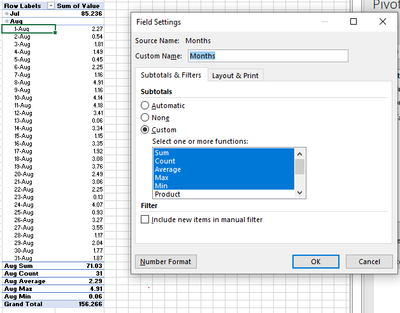
Hello. I am seeking some help to modify matrix visuals to include multiple subtotals for a single column. This is easily accomplished by changing the Field Settings in an Excel Pivot Table. See snapshot below that includes Sum, Count, Average, Max, and Min. In Power BI, I attemped to create a similar table using the Row Subtotal settings and by creating DAX measures for each function. In all cases, I either get a new row by each DATE and/or a new column with by each function type.
Does anyone know how to provide a layout similar to the one shown in the image?
Thanks!
@tcgarrod Matrix visual isn't nearly that advanced. You are into a custom matrix hierarchy territory. This example is for columns but it can also be done for rows. The New Hotness (Custom Matrix Hierarchy) - Microsoft Fabric Community
Thank you for the quick feedback. The posting at that link is a hoot! I'll try to incorporate this tomorrow. Thanks!
The Power BI Data Visualization World Championships is back! Get ahead of the game and start preparing now!
| User | Count |
|---|---|
| 7 | |
| 5 | |
| 2 | |
| 1 | |
| 1 |