cancel
Showing results for 
Search instead for 
Did you mean: 

Try your skills in the Power BI Dataviz World Championship! Round one ends June 26. Join now

Reply
tcgarrod
New Member

Matrix with Multiple Subtotal Functions

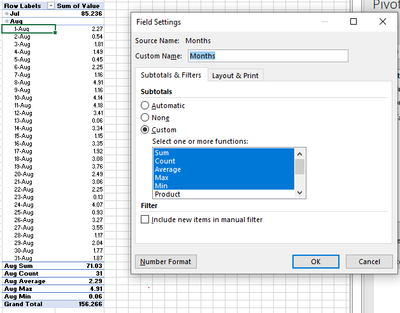
Hello.  I am seeking some help to modify matrix visuals to include multiple subtotals for a single column.  This is easily accomplished by changing the Field Settings in an Excel Pivot Table.  See snapshot below that includes Sum, Count, Average, Max, and Min.  In Power BI, I attemped to create a similar table using the Row Subtotal settings and by creating DAX measures for each function.  In all cases, I either get a new row by each DATE and/or a new column with by each function type.  


tcgarrod_0-1697490057893.png

Does anyone know how to provide a layout similar to the one shown in the image?  

Thanks!

2 REPLIES 2
Greg_Deckler
Community Champion
Community Champion

@tcgarrod Matrix visual isn't nearly that advanced. You are into a custom matrix hierarchy territory. This example is for columns but it can also be done for rows. The New Hotness (Custom Matrix Hierarchy) - Microsoft Fabric Community


Follow on LinkedIn
@ me in replies or I'll lose your thread!!!
Instead of a Kudo, please vote for this idea
Become an expert!: Enterprise DNA
External Tools: MSHGQM
YouTube Channel!: Microsoft Hates Greg
Latest book!:
DAX For Humans

DAX is easy, CALCULATE makes DAX hard...

Thank you for the quick feedback.  The posting at that link is a hoot!   I'll try to incorporate this tomorrow.  Thanks! 

Helpful resources

Announcements
Fabric Data Days is here Carousel

Data Days 2026

Don't miss out on Data Days, June 15 through August 7. Learn Fabric, Power BI, SQL, AI and more.

Power BI DataViz World Championships carousel

Power BI DataViz World Championships - June 2026

A new Power BI DataViz World Championship is coming this June! Don't miss out on submitting your entry.

Top Solution Authors