Join us at FabCon Atlanta from March 16 - 20, 2026, for the ultimate Fabric, Power BI, AI and SQL community-led event. Save $200 with code FABCOMM.
Register now!The Power BI Data Visualization World Championships is back! It's time to submit your entry. Live now!
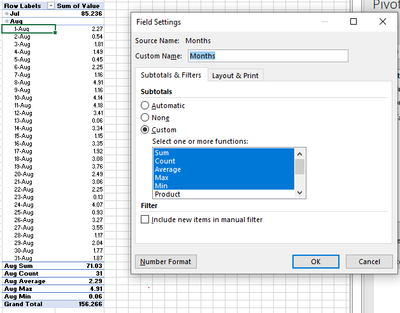
Hello. I am seeking some help to modify matrix visuals to include multiple subtotals for a single column. This is easily accomplished by changing the Field Settings in an Excel Pivot Table. See snapshot below that includes Sum, Count, Average, Max, and Min. In Power BI, I attemped to create a similar table using the Row Subtotal settings and by creating DAX measures for each function. In all cases, I either get a new row by each DATE and/or a new column with by each function type.
Does anyone know how to provide a layout similar to the one shown in the image?
Thanks!
@tcgarrod Matrix visual isn't nearly that advanced. You are into a custom matrix hierarchy territory. This example is for columns but it can also be done for rows. The New Hotness (Custom Matrix Hierarchy) - Microsoft Fabric Community
Thank you for the quick feedback. The posting at that link is a hoot! I'll try to incorporate this tomorrow. Thanks!
The Power BI Data Visualization World Championships is back! It's time to submit your entry.
Check out the January 2026 Power BI update to learn about new features.