Hi.
I have a table with more than 100 columns and more than 2000 rows of survey data. The data is weighted. Weights have been computed and is part of the table.
How do I show the percentage distribution of a particular survey variable but user can switch disaggregation by different variables?
For example:
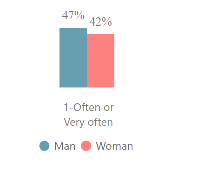
One survey variable asks for respondents perception of how they worked with their classmates (OCCGRP RESP (groups)) and I want to show the responses by different disaggregations (e.g. gender, age, marital status).
I was able to show the responses as %s for only one disaggregation- gender (see chart below). How can I use the same visual for users to switch among the different disaggregations (age, gender, marital status).
This is my DAX for computing the %s -
%occgrp_groups = sum('2007-2022'[IWEIGHT]) / CALCULATE(sum('2007-2022'[IWEIGHT]), all ('2007-2022'[OCCGRP RESP (groups)]))