Get certified for free when you join Fabric Data Days 2026 and dive into Fabric, Power BI, SQL, AI, and other essential data skills.
Join nowTry your skills in the Power BI Dataviz World Championship! Round one ends June 26. Join now
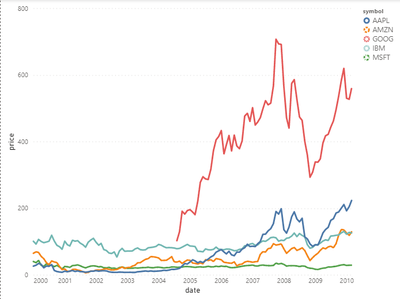
I am trying to create a dashed line chart but the lines remain solid in the plot area. Legend looks good. Any help would be appreciated. I am using sample stocks data here.
Below is my code
{
"config": {"view": {"continuousWidth": 400, "continuousHeight": 300}},
"data": {"name": "dataset"},
"mark": "line",
"encoding": {
"color": {"field": "symbol", "type": "nominal"},
"strokeDash": {"field": "symbol", "type": "nominal"},
"x": {"field": "date", "type": "temporal"},
"y": {"field": "price", "type": "quantitative"}
}
}
And below is what I am getting
This is what I am looking for
Solved! Go to Solution.
There is a setting in the Config that is providing a different default for the "line" mark. Delete this from the Config in the Deneb editor.
"line": {
"strokeWidth": 3,
"strokeCap": "round",
"strokeJoin": "round"
},
Pat
There is a setting in the Config that is providing a different default for the "line" mark. Delete this from the Config in the Deneb editor.
"line": {
"strokeWidth": 3,
"strokeCap": "round",
"strokeJoin": "round"
},
Pat
Thank You. It worked.
| User | Count |
|---|---|
| 1 | |
| 1 | |
| 1 | |
| 1 | |
| 1 |