cancel
Showing results for 
Search instead for 
Did you mean: 

Get Fabric Certified for FREE during Fabric Data Days. Don't miss your chance! Request now

Reply

Customized Bar Graph: Highlight a bar based on related data selection

Context: My data has two fields - Countries and Economy type.

CountryEconomy Type
Country01Command
Country02Traditional
Country03Mixed
Country04Traditional
Country05Traditional
Country06Mixed
Country07Command
Country08Command
Country09Market


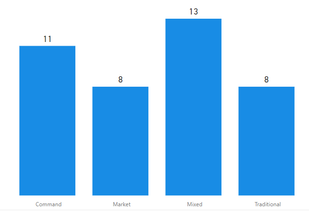
I've a bar graph for Economy type on X-Axis and Count of Country as Values.


pic.png


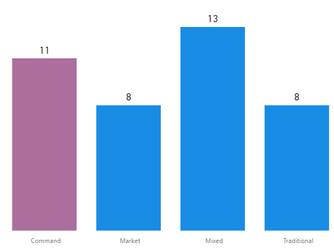
Now the requirement is - If I select any country - say using a Treemap, I want the bar to be highlighted in which the country's Economy time belongs... i.e. If I select Country01/ Country07 etc I should get the command bar highlighted!!!

pic.png

How to really do this in Power BI.


Thanks,

Sid


1 REPLY 1
v-viig
Community Champion
Community Champion

Please have a look at this guide.


Ignat Vilesov,

Software Engineer


Microsoft Power BI Custom Visuals

pbicvsupport@microsoft.com

Helpful resources

Announcements
November Power BI Update Carousel

Power BI Monthly Update - November 2025

Check out the November 2025 Power BI update to learn about new features.

Fabric Data Days Carousel

Fabric Data Days

Advance your Data & AI career with 50 days of live learning, contests, hands-on challenges, study groups & certifications and more!

FabCon Atlanta 2026 carousel

FabCon Atlanta 2026

Join us at FabCon Atlanta, March 16-20, for the ultimate Fabric, Power BI, AI and SQL community-led event. Save $200 with code FABCOMM.