Join us at FabCon Atlanta from March 16 - 20, 2026, for the ultimate Fabric, Power BI, AI and SQL community-led event. Save $200 with code FABCOMM.
Register now!The Power BI Data Visualization World Championships is back! It's time to submit your entry. Live now!
Hi
I created a Custom R visual using packages & versions as below
'dplyr' with version 0.8.0.1
'visNetwork' with version 2.0.3
Versions i chosed are based on the version recommendations shared in the docs page @Learn which R packages are supported - Power BI | Microsoft Docs
Visual is loading absolutely fine in Powerbi Desktop.
But when published to service its failing with Script Error, but NOT providing any details on why its failed.
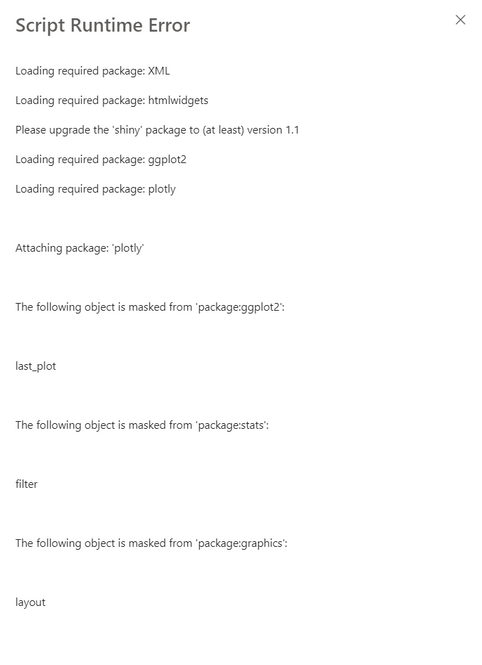
I am seeing below error, but i am NOT able to scroll to see on why the script is failing. Any help please!
Solved! Go to Solution.
Thanks for the response @ibendlin.
Actually for some reason, powerbi service is not giving the scrolling on the screen, because of which i was not able to see the complete details of the error when the website is set at 100% zoom.
When i did a zoom out to 30% .... i was able to see the actual error. The actual error is not related package version issue but something else.
After some tries, i was able to resolve the issue and visual is now working in pbi service as well.
Thanks a lot for the response still.
Thanks for the response @ibendlin.
Actually for some reason, powerbi service is not giving the scrolling on the screen, because of which i was not able to see the complete details of the error when the website is set at 100% zoom.
When i did a zoom out to 30% .... i was able to see the actual error. The actual error is not related package version issue but something else.
After some tries, i was able to resolve the issue and visual is now working in pbi service as well.
Thanks a lot for the response still.
are you using a personal gateway and is the gateway up to date on these packages?
The Power BI Data Visualization World Championships is back! It's time to submit your entry.
Check out the January 2026 Power BI update to learn about new features.