cancel
Showing results for 
Search instead for 
Did you mean: 

We've captured the moments from FabCon & SQLCon that everyone is talking about, and we are bringing them to the community, live and on-demand. Starts on April 14th. Register now

Reply
rajamahesh
Microsoft Employee
Microsoft Employee

Custom R visual is failing to load with Script Error on Powerbi Service but working on PBI Desktop

Hi 


I created a Custom R visual using packages & versions as below

'dplyr' with version 0.8.0.1

'visNetwork' with version 2.0.3

Versions i chosed are based on the version recommendations shared in the docs page @Learn which R packages are supported - Power BI | Microsoft Docs


Visual is loading absolutely fine in Powerbi Desktop.


But when published to service its failing with Script Error, but NOT providing any details on why its failed. 


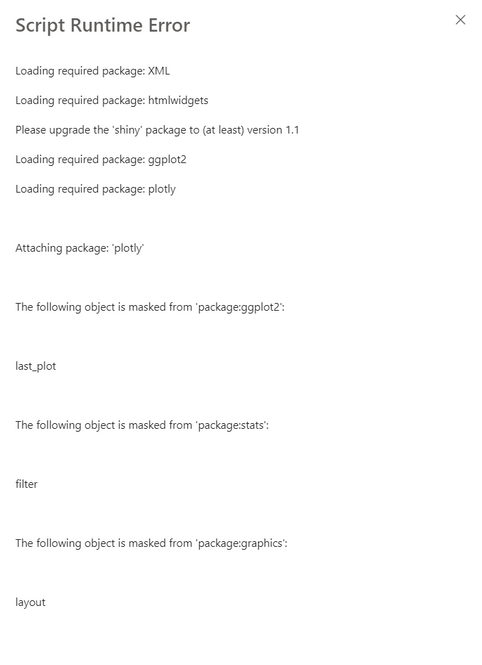
I am seeing below error, but i am NOT able to scroll to see on why the script is failing. Any help please!

rajamahesh_0-1626964018776.png


1 ACCEPTED SOLUTION
rajamahesh
Microsoft Employee
Microsoft Employee

Thanks for the response @ibendlin.

Actually for some reason, powerbi service is not giving the scrolling on the screen, because of which i was not able to see the complete details of the error when the website is set at 100% zoom.

When i did a zoom out to 30% .... i was able to see the actual error. The actual error is not related package version issue but something else. 


After some tries, i was able to resolve the issue and visual is now working in pbi service as well. 


Thanks a lot for the response still. 

View solution in original post

2 REPLIES 2
rajamahesh
Microsoft Employee
Microsoft Employee

Thanks for the response @ibendlin.

Actually for some reason, powerbi service is not giving the scrolling on the screen, because of which i was not able to see the complete details of the error when the website is set at 100% zoom.

When i did a zoom out to 30% .... i was able to see the actual error. The actual error is not related package version issue but something else. 


After some tries, i was able to resolve the issue and visual is now working in pbi service as well. 


Thanks a lot for the response still. 

lbendlin
Super User
Super User

are you using a personal gateway and is the gateway up to date on these packages?

Helpful resources

Announcements
New to Fabric survey Carousel

New to Fabric Survey

If you have recently started exploring Fabric, we'd love to hear how it's going. Your feedback can help with product improvements.

Power BI DataViz World Championships carousel

Power BI DataViz World Championships - June 2026

A new Power BI DataViz World Championship is coming this June! Don't miss out on submitting your entry.

Join our Fabric User Panel

Join our Fabric User Panel

Share feedback directly with Fabric product managers, participate in targeted research studies and influence the Fabric roadmap.

March Power BI Update Carousel

Power BI Community Update - March 2026

Check out the March 2026 Power BI update to learn about new features.

Top Solution Authors