Don't miss your chance to take the Fabric Data Engineer (DP-700) exam on us!
Learn moreNext up in the FabCon + SQLCon recap series: The roadmap for Microsoft SQL and Maximizing Developer experiences in Fabric. All sessions are available on-demand after the live show. Register now
Trying to calculate number of days between two date fields.
Here is what I have,
Days Overdue = DATEDIFF(MP_REP_DOCUMENT[RDOC_SCAN_DATE], (MP_REP_POSTING[RPST_CLEARING_DATE]), DAY)
Getting the following error:
A single value for column 'RDOC_SCAN_DATE' in table 'MP_REP_DOCUMENT' cannot be determined. This can happen when a measure formula refers to a column that contains many values without specifying an aggregation such as min, max, count, or sum to get a single result.
Hi,
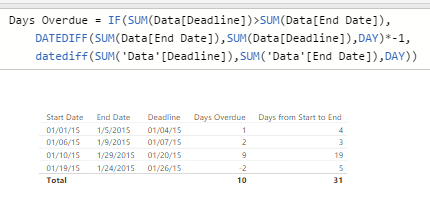
Your method is mostly right, but it needs a SUM for the column names to get it to work. I was assuming that you were wanting the number days after a deadline to make it 'Overdue'. I added an image to describe my thinking.
I added an extra part in case the end date is met before the deadline. I also added a "*-1" to this but you could just replace the entire second line of the formula with a 0 or whatever you desire.
This is that calculated measure formula:
Days Overdue = IF(SUM(Data[Deadline])>SUM(Data[End Date]),
DATEDIFF(SUM(Data[End Date]),SUM(Data[Deadline]),DAY)*-1,
DATEDIFF(SUM('Data'[Deadline]),SUM('Data'[End Date]),DAY))
If you are trying to just get the days between a start date that is always previous to an end date, it is pretty much what you had before except to add the SUMS. I made a calculated measure for the 'Days from Start to End' with this formula:
Days from Start to End = DATEDIFF(Sum(Data[Start Date]),SUM(Data[End Date]),DAY)
Now if you only want Monday-Friday to count as part of the days then it is a bit more complicated.
Hope this helps!
Hi,
Your method is mostly right, but it needs a SUM for the column names to get it to work. I was assuming that you were wanting the number days after a deadline to make it 'Overdue'. I added an image to describe my thinking.
I added an extra part in case the end date is met before the deadline. I also added a "*-1" to this but you could just replace the entire second line of the formula with a 0 or whatever you desire.
This is that calculated measure formula:
Days Overdue = IF(SUM(Data[Deadline])>SUM(Data[End Date]),
DATEDIFF(SUM(Data[End Date]),SUM(Data[Deadline]),DAY)*-1,
DATEDIFF(SUM('Data'[Deadline]),SUM('Data'[End Date]),DAY))
If you are trying to just get the days between a start date that is always previous to an end date, it is pretty much what you had before except to add the SUMS. I made a calculated measure for the 'Days from Start to End' with this formula:
Days from Start to End = DATEDIFF(Sum(Data[Start Date]),SUM(Data[End Date]),DAY)
Now if you only want Monday-Friday to count as part of the days then it is a bit more complicated.
Hope this helps!
Hello,
I'm a bit confused. Why would you sum dates? I'm also not sure why it wont perform the calculation for each row on the data in that row, but insists on summing data.
Experience the highlights from FabCon & SQLCon, available live and on-demand starting April 14th.
If you have recently started exploring Fabric, we'd love to hear how it's going. Your feedback can help with product improvements.
Share feedback directly with Fabric product managers, participate in targeted research studies and influence the Fabric roadmap.