cancel
Showing results for 
Search instead for 
Did you mean: 

Learn from the best! Meet the four finalists headed to the FINALS of the Power BI Dataviz World Championships! Register now

Reply
dia612
Helper IV
Helper IV

TreeMap Visual

Hola

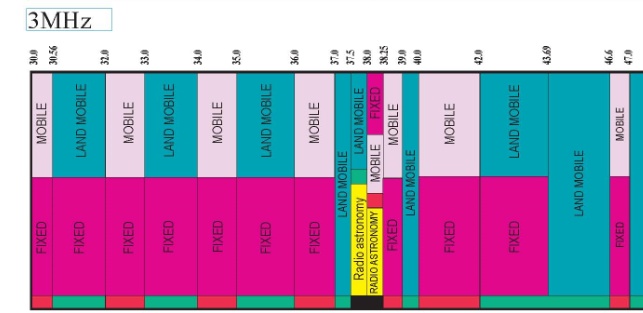
¿podemos crear visual similar a esto en power bi

En este objeto visual mostraron el nombre del servicio entre lowerlimit y upperlimit, si tenemos 2 nombres de servicio en el mismo intervalo, muestra ambos en ese intervalo.

imagen completa

https://www.ntia.doc.gov/files/ntia/publications/january_2016_spectrum_wall_chart.pdf
Untitled (2).png

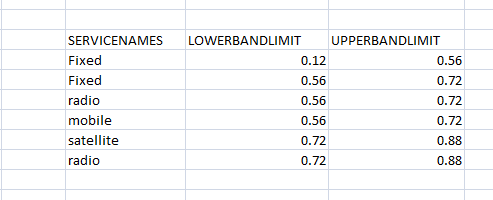
Tengo esta información

Untitled3.png

En esto, podemos ver entre 0.56 y 0.72 , tenemos servicios fijos y de radio y entre 0.72 y 0.88 , tenemos satélite y radio

Quiero mostrar estos datos como el 1o visual. He probado treemap, pero está agrupando todos los valores fijos y mostrando límites como 0.12 & 0.72

pero necesito mostrar ambos valores - 1o como 0.12-0.56 y 2o como 0.56-0.72

y b/n 0.56-0.72 tanto fija sandi

1 ACCEPTED SOLUTION
v-eachen-msft
Community Support
Community Support

Hola @dia612 ,

Me temo que Power BI no tiene un objeto visual actualmente. Puede hacer referencia a este sitio para desarrollar un objeto visual aquí o publicar sus ideas aquí para mejorar Power BI.

Community Support Team _ Eads
If this post helps, then please consider Accept it as the solution to help the other members find it.

View solution in original post

1 REPLY 1
v-eachen-msft
Community Support
Community Support

Hola @dia612 ,

Me temo que Power BI no tiene un objeto visual actualmente. Puede hacer referencia a este sitio para desarrollar un objeto visual aquí o publicar sus ideas aquí para mejorar Power BI.

Community Support Team _ Eads
If this post helps, then please consider Accept it as the solution to help the other members find it.

Helpful resources

Announcements
Join our Fabric User Panel

Join our Fabric User Panel

Share feedback directly with Fabric product managers, participate in targeted research studies and influence the Fabric roadmap.

March Power BI Update Carousel

Power BI Community Update - March 2026

Check out the March 2026 Power BI update to learn about new features.

Top Kudoed Authors