
We've captured the moments from FabCon & SQLCon that everyone is talking about, and we are bringing them to the community, live and on-demand. Starts on April 14th. Register now
A continuación se muestra la entrada
A continuación se muestra la salida
¿Sería esto posible usando Power Query?
Hi, @mandarmanik1
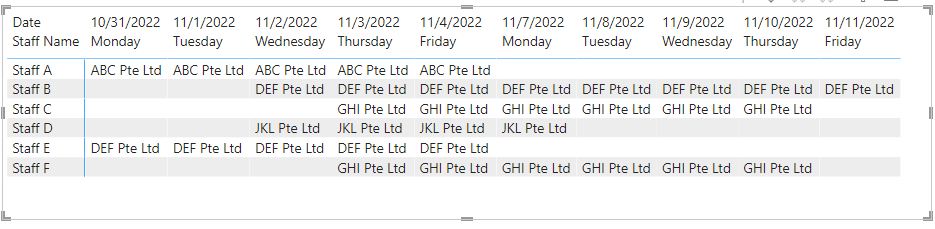
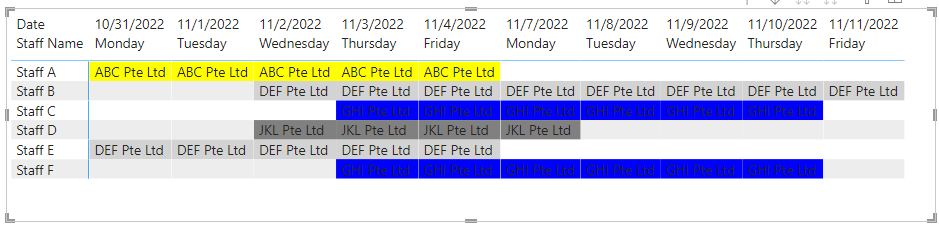
En la vista de matriz de Escritorio, puede generar los resultados que espera.
Columna:
End Date = [Start Date]+[Days Booked]
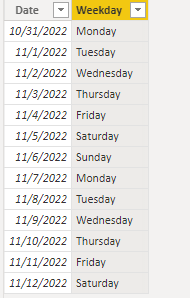
Cree una nueva tabla de fechas.
Date = CALENDAR(MIN('Table'[Start Date]),MAX('Table'[End Date]))
Columna:
Weekday = FORMAT([Date],"dddd")
Measure =
IF (
SELECTEDVALUE ( 'Date'[Weekday] ) = "Saturday",
BLANK(),
IF (
SELECTEDVALUE ( 'Date'[Weekday] ) = "Sunday",
BLANK(),
CALCULATE (
MAX ( 'Table'[Project Name] ),
FILTER (
ALL ( 'Table' ),
[Start Date] <= SELECTEDVALUE ( 'Date'[Date] )
&& [End Date] >= SELECTEDVALUE ( 'Date'[Date] )
&& [Staff Name] = SELECTEDVALUE ( 'Table'[Staff Name] )
)
)
)
)
Medir:
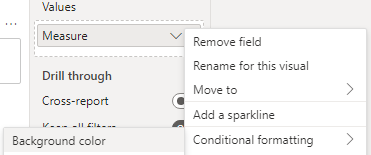
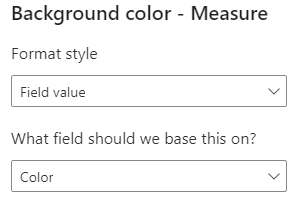
Color = SWITCH(TRUE(),
SELECTEDVALUE('Table'[Project Name])="ABC Pte Ltd","Yellow",
SELECTEDVALUE('Table'[Project Name])="DEF Pte Ltd","light gray",
SELECTEDVALUE('Table'[Project Name])="GHI Pte Ltd","blue",
SELECTEDVALUE('Table'[Project Name])="JKL Pte Ltd","gray")
¿Es este el resultado que esperas?
Saludos
Equipo de apoyo comunitario _Charlotte
Si esta publicación ayuda, considere Aceptarlo como la solución para ayudar a los otros miembros a encontrarlo más rápidamente.
Debe probar el diagrama de Gantt, que obtendrá en Power BI en la sección Obtener más elementos visuales.
If you have recently started exploring Fabric, we'd love to hear how it's going. Your feedback can help with product improvements.
A new Power BI DataViz World Championship is coming this June! Don't miss out on submitting your entry.
Share feedback directly with Fabric product managers, participate in targeted research studies and influence the Fabric roadmap.