Get Fabric certified for FREE!
Don't miss your chance to take the Fabric Data Engineer (DP-700) exam on us!
Learn more- Power BI forums
- Get Help with Power BI
- Desktop
- Service
- Report Server
- Power Query
- Mobile Apps
- Developer
- DAX Commands and Tips
- Custom Visuals Development Discussion
- Health and Life Sciences
- Power BI Spanish forums
- Translated Spanish Desktop
- Training and Consulting
- Instructor Led Training
- Dashboard in a Day for Women, by Women
- Galleries
- Data Stories Gallery
- Themes Gallery
- Contests Gallery
- QuickViz Gallery
- Quick Measures Gallery
- Visual Calculations Gallery
- Notebook Gallery
- Translytical Task Flow Gallery
- TMDL Gallery
- R Script Showcase
- Webinars and Video Gallery
- Ideas
- Custom Visuals Ideas (read-only)
- Issues
- Issues
- Events
- Upcoming Events
We've captured the moments from FabCon & SQLCon that everyone is talking about, and we are bringing them to the community, live and on-demand. Starts on April 14th. Register now
- Subscribe to RSS Feed
- Mark Topic as New
- Mark Topic as Read
- Float this Topic for Current User
- Bookmark
- Subscribe
- Printer Friendly Page


- Mark as New
- Bookmark
- Subscribe
- Mute
- Subscribe to RSS Feed
- Permalink
- Report Inappropriate Content
DAX
Cómo obtener todos los valores basados en valores seleccionados, por ejemplo: si seleccionamos "150", entonces necesitamos obtener todos los valores relacionados con "15" usando DAX
- Mark as New
- Bookmark
- Subscribe
- Mute
- Subscribe to RSS Feed
- Permalink
- Report Inappropriate Content
¡Perfecto! Recuerde marcar una respuesta preferida como una solución para ayudar a otros a encontrarla fácilmente. 🙂
- Mark as New
- Bookmark
- Subscribe
- Mute
- Subscribe to RSS Feed
- Permalink
- Report Inappropriate Content
Gracias a todos, funcionó con éxito. 👍
- Mark as New
- Bookmark
- Subscribe
- Mute
- Subscribe to RSS Feed
- Permalink
- Report Inappropriate Content
¿Desea filtrar la columna u obtener el valor completo como una fila o qué?
- Mark as New
- Bookmark
- Subscribe
- Mute
- Subscribe to RSS Feed
- Permalink
- Report Inappropriate Content
Hola @Dhruvan, aquí está la solución DAX. Sin embargo, personalmente prefiero ir por "Filtro de texto" visual sugerido por @mlsx4 . ¡Buena suerte!

Partial search measure =
VAR _FullSearchTerm = SELECTEDVALUE( 'Selected value'[Column1] )                //here we capture selected value, remember that only 1 value at a time should be selected, otherwise use iferror argument of SELECTEDVALUE()
VAR _NumberOfCharactersToSearch = 11                                            //change number to change number of characters you're interested in
VAR _RealSearchTerm = LEFT( _FullSearchTerm, _NumberOfCharactersToSearch )      // Assumption: first N left characters

RETURN
    IF(
        CONTAINSSTRING(
            SELECTEDVALUE( 'Related value'[Column1] ),
            _RealSearchTerm
        ),
        1,
        0
    )
- Mark as New
- Bookmark
- Subscribe
- Mute
- Subscribe to RSS Feed
- Permalink
- Report Inappropriate Content
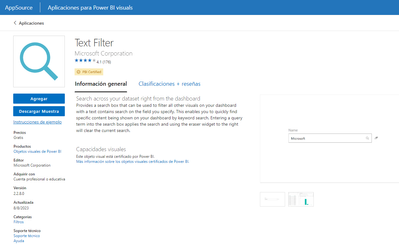
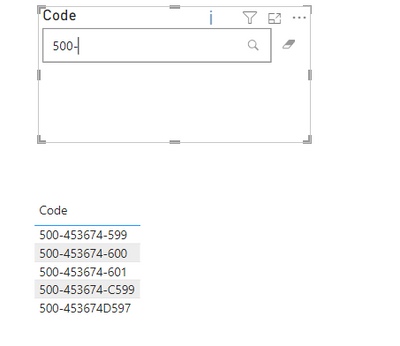
Puede importar desde el elemento visual del filtro de texto de la tienda. Hace exactamente lo que necesitas:
- Mark as New
- Bookmark
- Subscribe
- Mute
- Subscribe to RSS Feed
- Permalink
- Report Inappropriate Content
Parte de valor seleccionada - 500-453674-599
Parte de valor relacionado - 500-453674-600,
500-453674-601,
500-453674-588,
500-453674C599,
500-453674D597.
Entonces, cuando seleccionamos el valor mencionado (500-453674-599), debemos obtener todos los valores (las filas que coinciden con el prefijo del valor seleccionado) relacionados con él como se muestra en el ejemplo.
- Mark as New
- Bookmark
- Subscribe
- Mute
- Subscribe to RSS Feed
- Permalink
- Report Inappropriate Content
Explique en detalle y publique un ejemplo normal
- Mark as New
- Bookmark
- Subscribe
- Mute
- Subscribe to RSS Feed
- Permalink
- Report Inappropriate Content
Parte de valor seleccionada - 500-453674-599
Parte de valor relacionado: 500-453674-600,500-453674-601,500-453674-588,500-453674C599,500-453674D597.
Entonces, al seleccionar el valor mencionado (500-453674-599), debemos obtener todos los valores relacionados con él como se muestra en el ejemplo.
- Mark as New
- Bookmark
- Subscribe
- Mute
- Subscribe to RSS Feed
- Permalink
- Report Inappropriate Content

Helpful resources

New to Fabric Survey
If you have recently started exploring Fabric, we'd love to hear how it's going. Your feedback can help with product improvements.

Power BI DataViz World Championships - June 2026
A new Power BI DataViz World Championship is coming this June! Don't miss out on submitting your entry.

Join our Fabric User Panel
Share feedback directly with Fabric product managers, participate in targeted research studies and influence the Fabric roadmap.

Power BI Community Update - March 2026
Check out the March 2026 Power BI update to learn about new features.


