cancel
Showing results for 
Search instead for 
Did you mean: 

We've captured the moments from FabCon & SQLCon that everyone is talking about, and we are bringing them to the community, live and on-demand. Starts on April 14th. Register now

Reply
enath
Helper I
Helper I

refresh data from server

Hello,


I try to understand. 

I can refresh dataset data from the server using sql connection.

I tried to refresh dataset data imported from folder, but it is not supported. So I moved my data to a sharepoint and I connected the sharepoint to power BI. After publishing the dataset and the report I put the credentials sharepoint to the dataset settings but I don't see that the refresh from the from the server is really doing his job. After refreshing I don't see the new data added to the sharepoint before.

Is there is a way to use the refresh from server for sharepoint data? 

What are the option to be able to make the refresh from server without using SQL DB

Thanks!

1 ACCEPTED SOLUTION

Thanks for that. I did not know that. I put the gateway anyway....

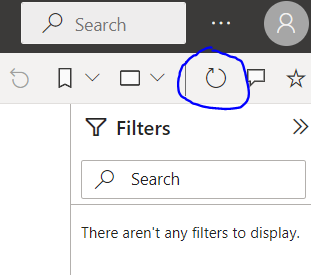
I found out that I had to refresh the data in the report also here in order to see the refreshed data, without that I cannot see the refresh data

enath_0-1659934213051.png


View solution in original post

4 REPLIES 4
GilbertQ
Super User
Super User

Hi @enath 


If you are using SharePoint online you can refresh data from SharePoint. You also do not need a gateway to refresh the data. You can point Power BI to the SharePoint Folder to get the files.


Here is an example on how to complete this: Refresh a dataset from OneDrive or SharePoint Online - Power BI | Microsoft Docs


Did I answer your question? Mark my post as a solution!

Proud to be a Super User!


Power BI Blog

Thanks for that. I did not know that. I put the gateway anyway....

I found out that I had to refresh the data in the report also here in order to see the refreshed data, without that I cannot see the refresh data

enath_0-1659934213051.png


Hi @enath ,

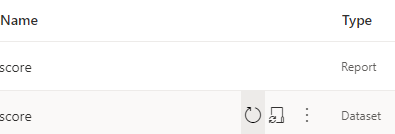
On demand is performed immediately. May be you can try to use schedule refresh. Or refresh the dataset on demand.

memepu_0-1660097632077.png

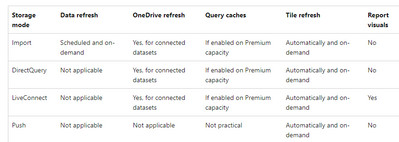
Different connection modes can be used for different refreshes so that there is no need to refresh manually.


About refresh: How to configure Power BI report scheduled refresh 

Data refresh in Power BI 


memepu_1-1660097834664.png

Best regards.


Thank you very much for helping. I will learn about the others solutions also you described.

Helpful resources

Announcements
New to Fabric survey Carousel

New to Fabric Survey

If you have recently started exploring Fabric, we'd love to hear how it's going. Your feedback can help with product improvements.

Power BI DataViz World Championships carousel

Power BI DataViz World Championships - June 2026

A new Power BI DataViz World Championship is coming this June! Don't miss out on submitting your entry.

Join our Fabric User Panel

Join our Fabric User Panel

Share feedback directly with Fabric product managers, participate in targeted research studies and influence the Fabric roadmap.

March Power BI Update Carousel

Power BI Community Update - March 2026

Check out the March 2026 Power BI update to learn about new features.