Don't miss your chance to take exam DP-600 or DP-700 on us!
Request nowLearn from the best! Meet the four finalists headed to the FINALS of the Power BI Dataviz World Championships! Register now
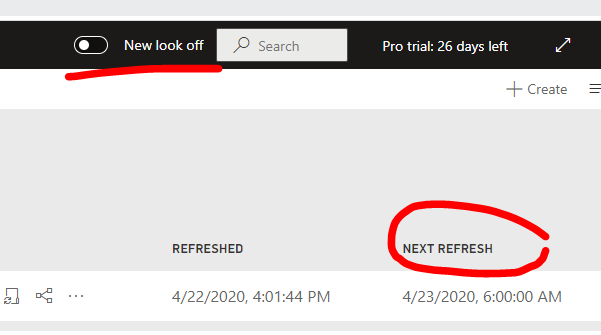
In the new look workspace, it is possible to see the 'next refresh' information.
This allow to quickly differentiate all the dataset on hold and the active one.
Hi,
In old look view pane, i can see 'Next Refresh'.
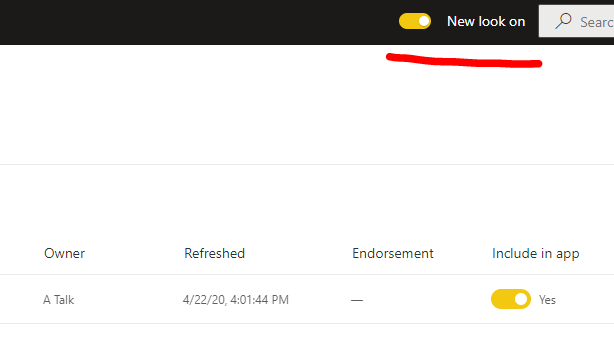
But in new look view pane, i can not see this info.
Best Regards,
Giotto
I do not know of a way to do that but it does show when each item was last refreshed.
Hji
My questioin was: is it possible to see the 'next refresh' in the new look,
underline it is possible to see it in the old look.
Hi,
i think it is impossible to see the 'Next Refresh' in the new look.
Best Regards,
Giotto
I understand it is currently no more possible to see the 'next refresh'
This is a request of update.
the reason is taht this allows to quickly visualize in 1 view in the workspace all the dataset that have
- correctly refresh, and have a next refresh scheduled
- failed, and disconnected from the gateway source, and the daily refresh was disabled.
this was possible in the old view.
Share feedback directly with Fabric product managers, participate in targeted research studies and influence the Fabric roadmap.
Check out the February 2026 Power BI update to learn about new features.