


cancel
Showing results for 
Search instead for 
Did you mean: 

Data Days is here! Join us now for 60+ days of learning, challenges, and connection. Learn more

Reply
Anonymous
Not applicable

navigation toolbar/popup missing from fullscreen App pages

Hi,


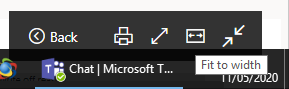
Where is the navigation popup now? It's missing from fullscreened Apps after a recent update?


I have users on a variety of machines/resolutions so the fit to width option was essential for a good user experience. 


It's still there on fullscreened dashboards. 


5 REPLIES 5
Anonymous
Not applicable

Hi, 


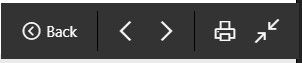
Does anybody know how to get these navigation buttons in the full screen mode:

Gertop_0-1640104456329.png

The only thing I see is "show navigation"

Gertop_1-1640104735388.png

The only way to navigate to the next page is by opening the navigation pane, select the next page and going back to full screen. This is not very convenient in a presentation. 


Hope somebody know how to solve this. 


Kind regards


Icey
Community Support
Community Support

Hi @Anonymous ,


Do you mean that you can't find this?

back.jpg


Under New look, it's in the lower left corner of the page:

new2.jpg


Or, you can turn off "New look on" to return to the classic mode. 

new.PNG


Best Regards,

Icey


If this post helps, then please consider Accept it as the solution to help the other members find it more quickly.

Anonymous
Not applicable

Hi @Icey 


Similar, what I'm looking for is this


It used to display when you fullscreen an app dashboard page. 

:Capture.PNG

Icey
Community Support
Community Support

Hi @Anonymous ,


In the New Look, this is cancelled. You can try to return to classic look by turn off "New look on" icon.

Or, post your idea on Power BI Ideas. It is a place for customers to provide feedback about Power BI.


Best Regards,

Icey


If this post helps, then please consider Accept it as the solution to help the other members find it more quickly.

Anonymous
Not applicable

@Icey 


Sigh


Why on earth would you remove a really useful peiece of functionality...and then add it into a pool of community improvements...

Helpful resources

Announcements
Fabric Data Days is here Carousel

Fabric Data Days 2026

Don't miss out on Data Days, June 15 through August 7. Learn Fabric, Power BI, SQL, AI and more.

May Power BI Update Carousel

Power BI Monthly Update - May 2026

Check out the May 2026 Power BI update to learn about new features.

Power BI DataViz World Championships carousel

Power BI DataViz World Championships - June 2026

A new Power BI DataViz World Championship is coming this June! Don't miss out on submitting your entry.