Join us at FabCon Atlanta from March 16 - 20, 2026, for the ultimate Fabric, Power BI, AI and SQL community-led event. Save $200 with code FABCOMM.
Register now!Get Fabric Certified for FREE during Fabric Data Days. Don't miss your chance! Request now
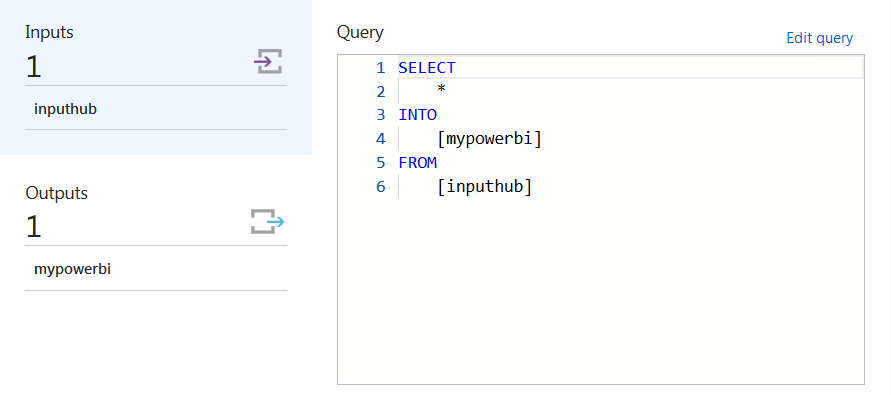
I am using an Azure stream analytics job to push data from the Particle platform to Power BI
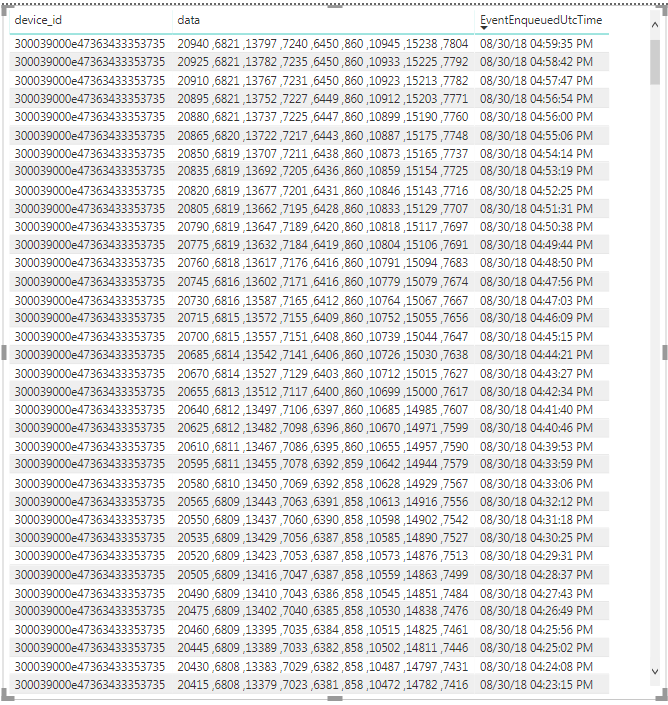
When the data comes into my Power bi it is displayed as follows:
My data is listed as follows: Machine cycle count, Lane 1 count, Lane 2 count, Lane 3 count...., Lane 8 count
I want to be able to provide a percentage of lane usage (Lane1count/cyclecount) and a percent usage for the entire machine ((Sum(lane1count...Lane8count))/8)/Cyclecount. Is there a way to break up my data so they are each in their own column or is that even necessary? Is there a way to get the percentages I need using the measure tool?
Solved! Go to Solution.
I had to break up the data at my code level, I changed my string output. I am finding that Power bi isn't that user friendly for live data. I am still trying to get familiar with the platform but it's been very frustrating so far.
String StringReturn = String::format("{\"CC\":%d, \"L1\":%d, \"L2\":%d, \"L3\":%d, \"L4\":%d, \"L5\":%d, \"L6\":%d, \"L7\":%d, \"L8\":%d, \"EF\":%d}",
Cycle,
LaneCount[0],
LaneCount[1],
LaneCount[2],
LaneCount[3],
LaneCount[4],
LaneCount[5],
LaneCount[6],
LaneCount[7],
MachineEfficiency);
Hi @dtuttoil,
Since the pushing dataset can't be used in Desktop, I'm afraid it's hard to apply any calculation steps. Can you do some calculation before pushing? Reference: service-real-time-streaming#can-i-connect-to-push-or-streaming-datasets-in-power-bi-desktop.
Best Regards,
Dale
I had to break up the data at my code level, I changed my string output. I am finding that Power bi isn't that user friendly for live data. I am still trying to get familiar with the platform but it's been very frustrating so far.
String StringReturn = String::format("{\"CC\":%d, \"L1\":%d, \"L2\":%d, \"L3\":%d, \"L4\":%d, \"L5\":%d, \"L6\":%d, \"L7\":%d, \"L8\":%d, \"EF\":%d}",
Cycle,
LaneCount[0],
LaneCount[1],
LaneCount[2],
LaneCount[3],
LaneCount[4],
LaneCount[5],
LaneCount[6],
LaneCount[7],
MachineEfficiency);
Check out the November 2025 Power BI update to learn about new features.
Advance your Data & AI career with 50 days of live learning, contests, hands-on challenges, study groups & certifications and more!