cancel
Showing results for 
Search instead for 
Did you mean: 

The Power BI Data Visualization World Championships is back! Get ahead of the game and start preparing now! Learn more

Reply
Anonymous
Not applicable

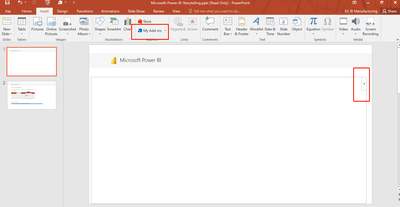
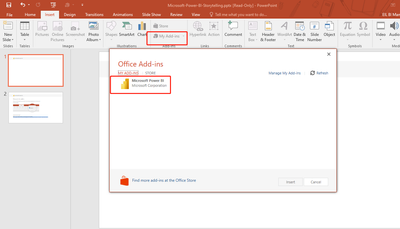
embed live data in Microsoft Power Point presentation

BULBUL89_1-1663577178483.png

BULBUL89_0-1663577087488.png

BULBUL89_3-1663577370941.png


I can't see embed live data in Microsoft Power Point


1 ACCEPTED SOLUTION
v-luwang-msft
Community Support
Community Support

HI @Anonymous ,

To use the Power BI add-in for PowerPoint, you must have access to the Office add-in store, or the add-in must be available to you as an admin managed add-in.

To be able to view live Power BI data in PowerPoint, you must have an active Power BI account and a Power BI Free license, as well as access to the data. If the Power BI report isn't located in a Premium capacity, a Power BI Pro license is needed.

And it with the below limitations:

  • The Power BI storytelling add-in requires WebView2 to run Power BI in PowerPoint. WebView2 comes standard on recent Windows versions, but if you get an error when you try to use the add-in, you may need to install it manually. See Troubleshoot the Power BI add-in for PowerPoint for details.
  • The Power BI add-in for PowerPoint does not support business-to-business (B2B) scenarios.
  • The Power BI add-in for PowerPoint is not supported in national clouds.

To learn more details ,refer:

https://learn.microsoft.com/en-us/power-bi/collaborate-share/service-power-bi-powerpoint-add-in-about 


In addition, this is a PREVIEW feature, there may be many aspects of the current imperfection, please look forward to the subsequent continuous improvement of the feature.


Best Regards

Lucien

View solution in original post

1 REPLY 1
v-luwang-msft
Community Support
Community Support

HI @Anonymous ,

To use the Power BI add-in for PowerPoint, you must have access to the Office add-in store, or the add-in must be available to you as an admin managed add-in.

To be able to view live Power BI data in PowerPoint, you must have an active Power BI account and a Power BI Free license, as well as access to the data. If the Power BI report isn't located in a Premium capacity, a Power BI Pro license is needed.

And it with the below limitations:

  • The Power BI storytelling add-in requires WebView2 to run Power BI in PowerPoint. WebView2 comes standard on recent Windows versions, but if you get an error when you try to use the add-in, you may need to install it manually. See Troubleshoot the Power BI add-in for PowerPoint for details.
  • The Power BI add-in for PowerPoint does not support business-to-business (B2B) scenarios.
  • The Power BI add-in for PowerPoint is not supported in national clouds.

To learn more details ,refer:

https://learn.microsoft.com/en-us/power-bi/collaborate-share/service-power-bi-powerpoint-add-in-about 


In addition, this is a PREVIEW feature, there may be many aspects of the current imperfection, please look forward to the subsequent continuous improvement of the feature.


Best Regards

Lucien

Helpful resources

Announcements
Power BI DataViz World Championships

Power BI Dataviz World Championships

The Power BI Data Visualization World Championships is back! Get ahead of the game and start preparing now!

December 2025 Power BI Update Carousel

Power BI Monthly Update - December 2025

Check out the December 2025 Power BI Holiday Recap!

FabCon Atlanta 2026 carousel

FabCon Atlanta 2026

Join us at FabCon Atlanta, March 16-20, for the ultimate Fabric, Power BI, AI and SQL community-led event. Save $200 with code FABCOMM.